Go to Backups > Settings.
Backup directory
Where archives are kept. Leave it empty to keep them where the site keeps its files:
- Files on this server: in
backupsin Omeka's files folder (for example/var/www/omeka/files/backups), which Omeka upgrades keep. - Files in cloud storage (such as Backblaze B2 or Amazon S3, through Omeka's
storage.adapterinconfig.ini): in that storage, underbackups/<random folder>/, next to the site's files. Each archive is made in a private folder in the server's temporary directory first, then stored, and removed from the server. Downloads and download links pass through the site, so the archive's address in the storage is never shown; a restore copies the archive back to the server first. The Backups page says where archives go.
To keep archives on this server whatever the file storage, enter a full path the web server can write to.
Cloud storage that serves its files publicly, as most Omeka storage setups do, serves archives the same way: what keeps an archive private there is its folder, whose name is 32 random characters (about 10^38 possibilities), as in the files folder. The address is never shown: downloads pass through the site. Delete archives you no longer need.
Backup protects the directory as well as it can from inside it: an .htaccess file denies access on Apache, an empty index.html stops directory listings, and each archive is kept in a folder whose name is 32 random characters (<folder>/<archive name>), so its address cannot be guessed even where the web server serves the folder without reading .htaccess, as nginx does. An archive holds the whole site, accounts included, so a folder outside the web root is safest when you can choose one. The directory is left out of the archives themselves.
The directory also holds the log, a line for every backup, restore, download and link. Its name has a random part too (backup-<32 characters>.log), as it names archives and the addresses links were used from (for archives in cloud storage, the private temporary folder holds it, and it does not last).
Backups to keep
After each backup made on this site, older ones beyond this number are deleted (5 at first). Set it to 0 to keep them all. The backup a restore makes first counts as one of them. Archives you uploaded, downloaded from a link or copied to the server are never deleted automatically.
Scheduled backups
The settings page shows a cron line for a nightly backup. See Scheduled Backups.
Links to private network addresses
To keep a download link from making the server reach services that are not public, Backup only downloads archives from public internet addresses. To move a site between servers on a private network, the server administrator can allow private addresses by adding this line to application/config/config.ini:
backup.allowPrivateLinks = true
The command line's fetch command takes --allow-private for the same purpose.
Background jobs
Omeka runs long-running jobs by starting PHP on the command line. It finds PHP by itself; if it picks the wrong one, set background.php.path in application/config/config.ini to your PHP command-line binary. When a job cannot start or stops, the Backups page says why, and the command line does the same work.
Check background jobs, at the bottom of the Settings tab, shows whether this server can run them, and if not, why:
- how Omeka runs long jobs (
jobs.dispatcher.longRunninginconfig.ini): Backup expects the background process adapter; - where archives are kept: the backup directory can be written to, and, for cloud storage, a small test file is stored, read back at its address and deleted;
- the PHP command-line program Omeka uses, or why it cannot find one (for example when the web server gives PHP no search path);
- that PHP's version and extensions, beside the web server's: a different version is a warning, because every active plugin is loaded in a job, and a missing
zip,mysqli,curlorjsonextension is a problem; - a test job, run with Omeka's own background script, with what PHP printed (errors included, which Omeka otherwise discards).
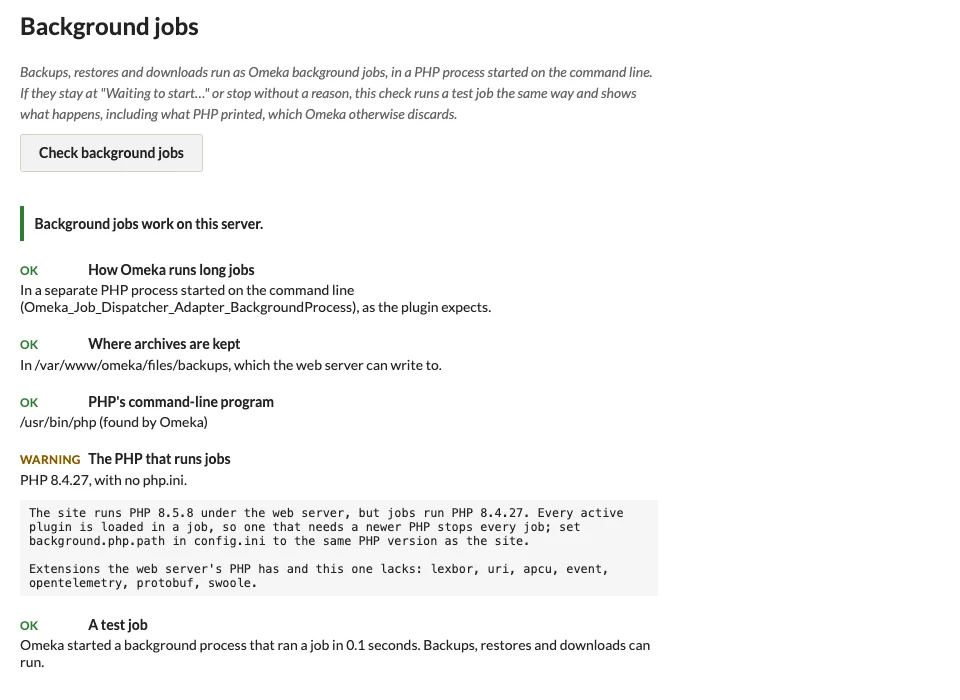
The check only runs a job that notes that it ran; it changes nothing else.