The public blog is available on every site at /s/{site-slug}/blog as soon as the module is installed. This page covers how to link to it, embed posts on other pages, and adapt the templates to your theme.
Adding the blog to site navigation
- Go to Admin > Sites > (your site) > Navigation.
- In the Add a link panel, choose the Blog link type.
- Enter a Label (defaults to "Blog") and drag the link into position.
- Click Save.
The label you enter is also used as the heading and page title of the blog index. Without a Blog navigation link the heading falls back to "Blog".
Public pages
| Page | URL |
|---|---|
| Index | /s/{site-slug}/blog (paginated with ?page=N) |
| Single post | /s/{site-slug}/blog/post/{slug} |
| Author archive | /s/{site-slug}/blog/author/{user-id} |
| Tag archive | /s/{site-slug}/blog/tag/{tag-slug} |
| Category archive | /s/{site-slug}/blog/category/{category-slug} |
| Preview (logged in) | /s/{site-slug}/blog/post/{slug}/preview |
The index shows post summaries (thumbnail, title, author, date, category, excerpt, tags, Read more) with a sidebar of categories and tags, and Previous / Next pagination. The post page shows the byline, content, tags, the comments section, More posts by the author, and a sidebar with the featured image and the About the author box. Themes can restyle both; the screenshots below show the Plinth theme.
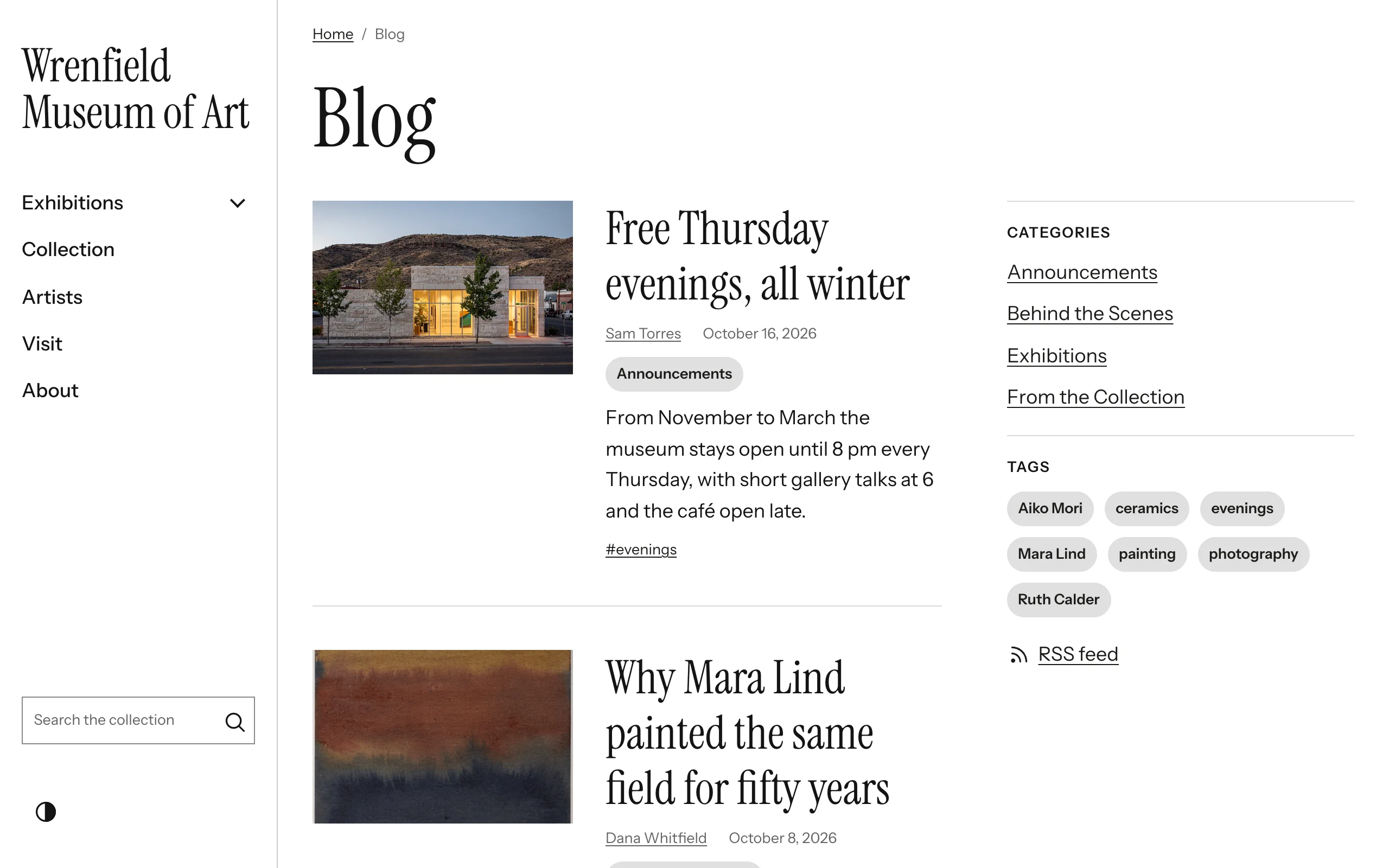
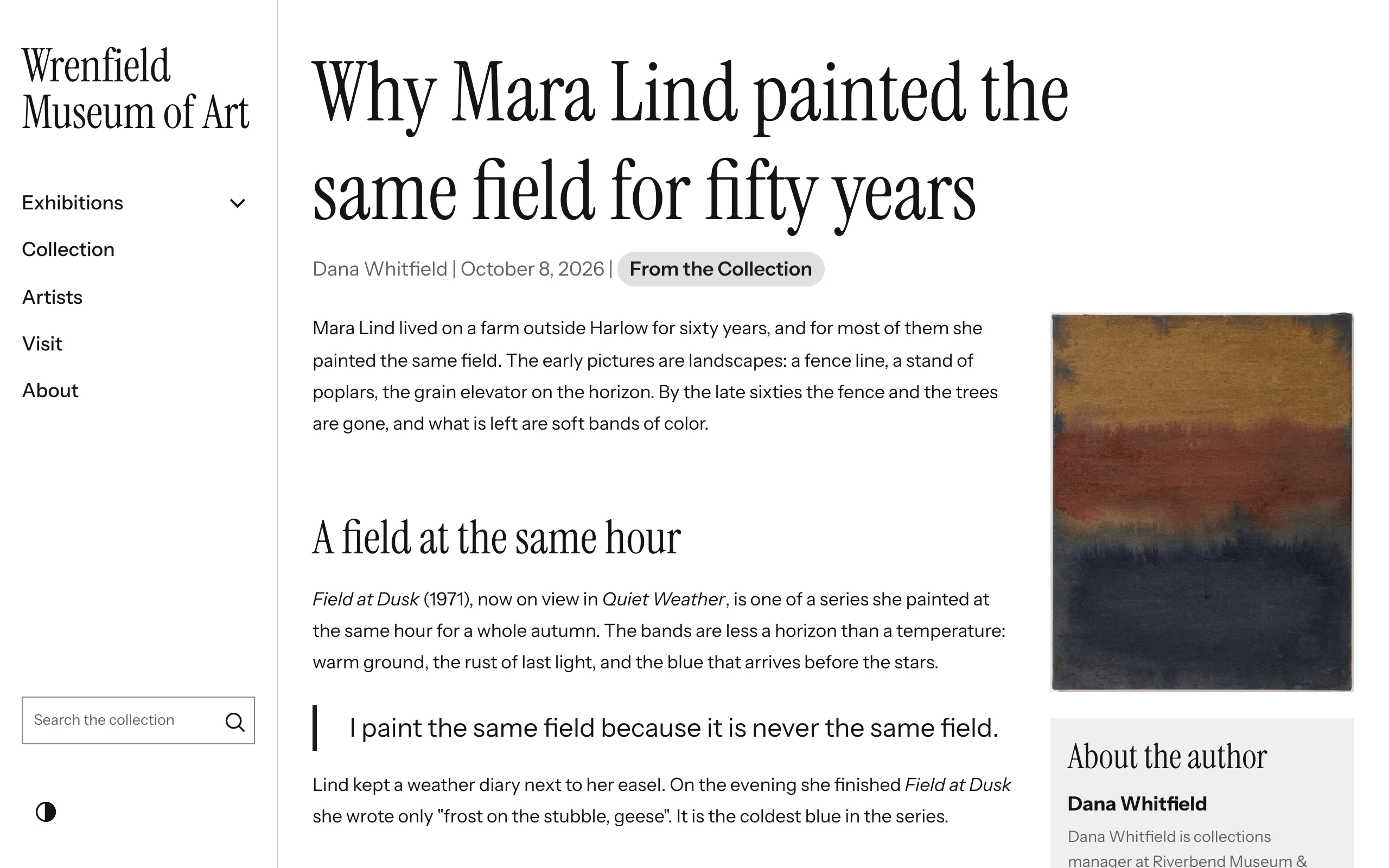
The Blog Posts page block
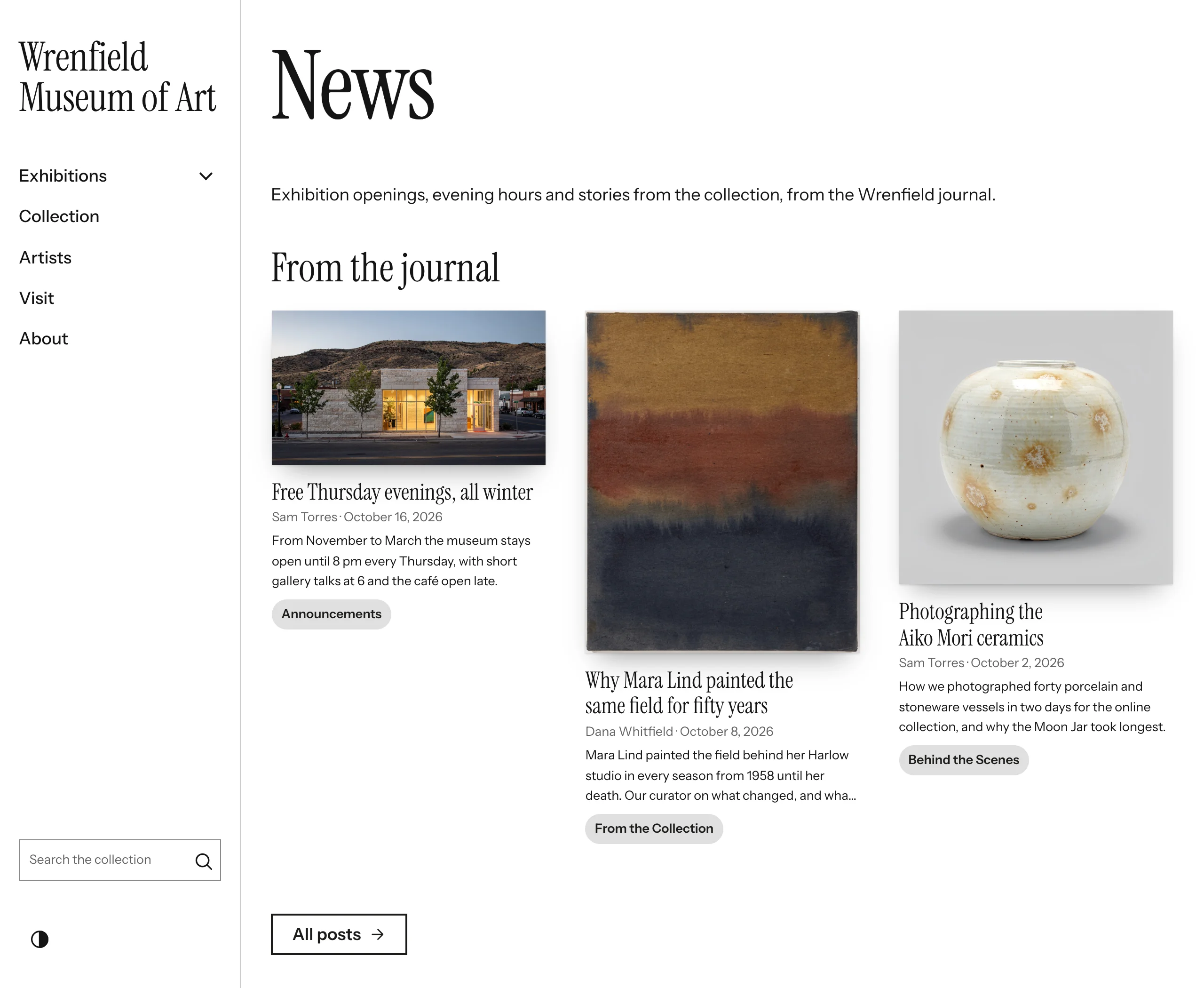
Embed a list of posts on any site page:
- Edit the page under Admin > Sites > (site) > Pages and add a Blog Posts block.
- Set the options below and save the page.
| Option | Default | Description |
|---|---|---|
| Block heading | empty | Heading above the list. It links to the blog index, or to the category or tag archive when a filter is set. |
| Number of posts to display | 5 |
1 to 50. |
| Show post title | on | |
| Show excerpt | on | Excerpt with HTML stripped, cut at 300 characters. |
| Show featured image | on | |
| Show date | on | Publish date. |
| Show author | on | |
| Show category | on | Category pill. |
| Show tags | on | Tag pills. |
| "Read more" link text (leave blank to hide) | Browse all posts |
A link after the list to the same destination as the heading. |
| Filter by category | All categories | Show only posts in one category. |
| Filter by tag | All tags | Show only posts with one tag. |
The block only shows published, non-scheduled posts assigned to the page's site. It renders "No posts found." when nothing matches.
Theme templates
The module ships working templates and appends its stylesheet (asset/css/blog.css) on blog pages and on pages that contain a Blog Posts block. To customise, copy any of these files into your theme at the same path and edit the copy:
view/omeka/site/blog/index.phtml
view/omeka/site/blog/show.phtml
view/omeka/site/blog/author.phtml
view/omeka/site/blog/tag.phtml
view/omeka/site/blog/category.phtml
view/common/blog/post-list.phtml
view/common/block-layout/blog-posts.phtml
The index and the tag, category and author archives render their post summaries and pagination through the shared view/common/blog/post-list.phtml, so overriding that one file restyles all four lists. The pages render inside your theme's layout, which provides the page's <main> landmark; the templates do not add another.
Templates receive plain arrays: $posts (each with title, slug, excerpt, content, status, published_at, author_name, category_name, category_slug, featured_image_url, featured_image_asset_id and a tags array), plus $total, $page, $perPage, and on the index $categories and $tags. The post page additionally receives $post (with an author array of name, avatar, bio), $category, $tags, $comments (approved), $commentForm (a Blog\Form\CommentForm, or null when comments are off), $recentByAuthor, $jsonLd and $isPreview. Always pass true as the fourth argument of $this->url() so links keep the current site slug:
<?php echo $this->url('site/blog/post', ['slug' => $post['slug']], [], true); ?>
A post's featured image is an asset (featured_image_asset_id, the post form's only option) or, for a post without one, an image URL set through the API (featured_image_url). $this->blogFeaturedImage($post) returns the image URL in either case, building an asset's URL when the page is shown so it follows the site's current address (an empty string when there is no image or the asset was deleted). For pagination links that stay on the current archive, reuse the matched route: $this->url(null, [], ['query' => ['page' => $n]], true).
Styling
blog.css is theme-agnostic. Its colors come from the theme's neutral --theme-* tokens when the theme provides them (as the Vitrine theme does, in light and dark schemes), and otherwise from light defaults. You can also override the module's own variables in your theme stylesheet:
:root {
    --blog-accent: #2b6cb0;        /* Read more and comment buttons (from --theme-primary) */
    --blog-on-accent: #fff;        /* text on those buttons (--theme-on-primary) */
    --blog-bg: #ffffff;            /* post summary background (--theme-surface) */
    --blog-surface-alt: #fafafa;   /* author box, tags (--theme-surface-alt) */
    --blog-sidebar-bg: #ededed;    /* blog index sidebar (--theme-surface-alt) */
    --blog-text: #222;             /* post and excerpt text (--theme-text) */
    --blog-muted: #6b7280;         /* meta text (--theme-text-muted) */
    --blog-border: #e6e6e6;        /* (--theme-border) */
    --blog-border-strong: #8a8f98; /* comment form fields, 3:1 or more (--theme-border-strong) */
    --blog-radius: 0px;            /* (--theme-radius) */
}
Keep each text color at 4.5:1 or more against its background (WCAG AA).
When Primary color is set in Blog Settings, the module sets --blog-accent to it, and --blog-on-accent to white or near-black, whichever contrasts more (black on the few mid-tones where neither reaches 4.5:1), on every blog page and on pages with a Blog Posts block. Its rule (:root:root) outranks a theme's :root, so the setting wins; leave it blank to let the theme decide.
A theme that styles the buttons itself, rather than through --blog-accent, can still follow the setting. Because --blog-accent always has a value (blog.css gives it the theme's or its own default), the same rule also declares --blog-primary-color and --blog-on-primary-color, and only while the setting has a value. Read them with the theme's own colour as the fallback:
.comment-form button {
    background: var(--blog-primary-color, var(--my-theme-primary));
    color: var(--blog-on-primary-color, var(--my-theme-on-primary));
}
The RefBytes Theme Engine themes do this from Vitrine 0.8.2, Confetti 0.5.2, Plinth 0.2.2 and Overprint 0.2.2.
Useful class names: .blog-preview-banner (shown on unpublished posts in preview), .post-summary, .post-summary__title, .post-summary__meta, .post-summary__excerpt, .post-category, .post-tag, .tag-cloud, .blog-index__sidebar, .blog-post__layout, .blog-post__content, .blog-post__sidebar, .author-box, .author-recent-posts, .blog-posts-block, .blog-pagination.
Built-in behaviour on post pages
- Lightbox: images inside the post content and the sidebar featured image open in an overlay when clicked. Close with the button, by clicking outside, or with Escape.
- Code highlighting:
<pre><code>blocks inserted with the CKEditor code snippet button are highlighted with highlight.js (GitHub style). - Structured data and feeds: see Feeds and Sitemap.