A restore replaces the live resource's metadata with a stored snapshot. It requires the editor role or higher.
Restoring
- Open the resource's Version History tab, the Resource Versions browse page, a version's snapshot page, or a compare page.
- Click Restore (the undo icon, or Restore version N on the compare page) next to the version you want to return to.
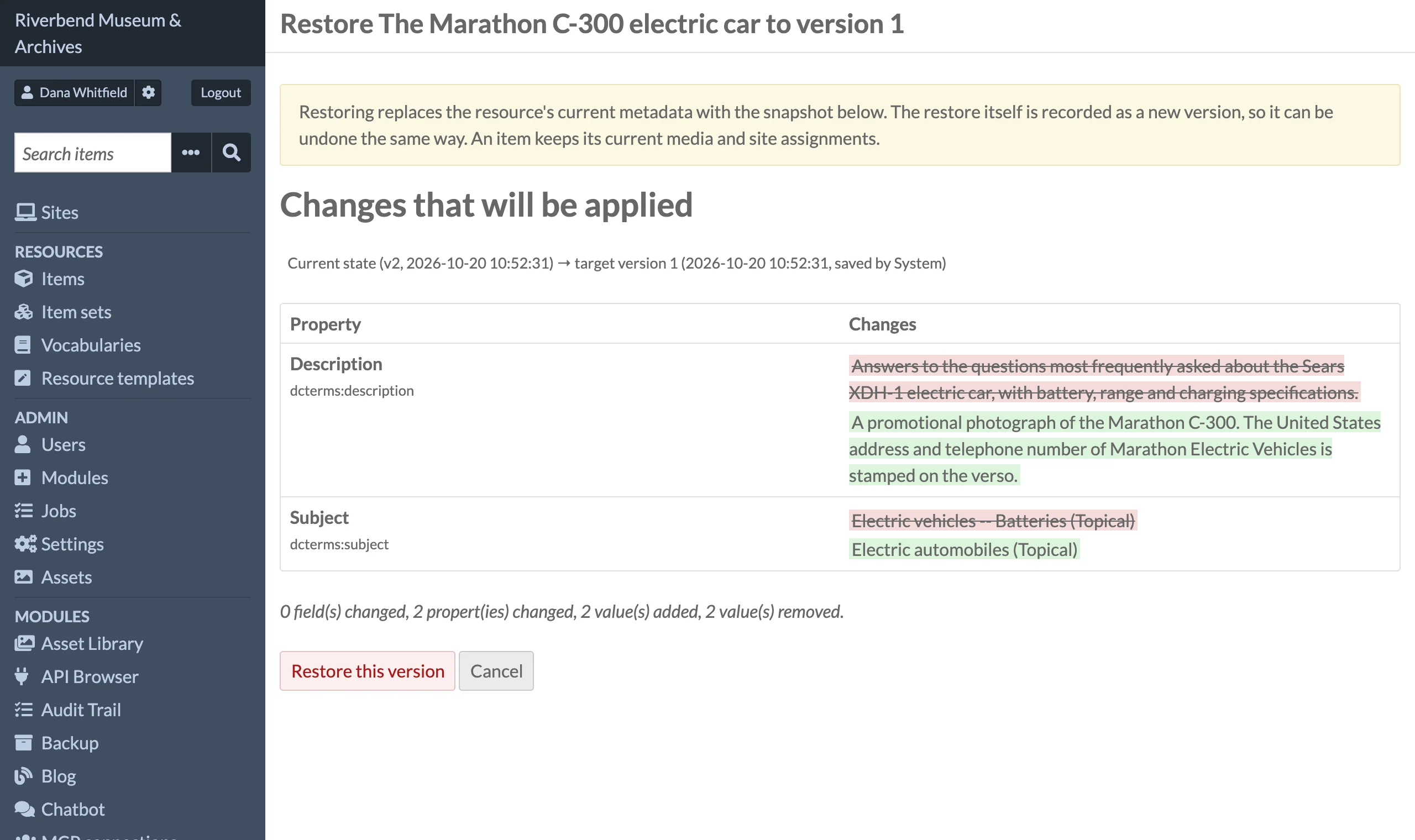
- Review the confirmation page at
/admin/resource-versioning/restore/<version id>. It shows the changes that will be applied as a diff from the current state to the target version, and lists any values that will be dropped. - Click Restore this version, or Cancel to go back to the resource history.
After a successful restore you are returned to the resource history page with a success message. Any dropped values are reported as warnings.
Which version to pick
Version N is the state of the resource after save N. To undo save N, restore version N-1. The Diff link on a row shows exactly what save N changed, and the Restore version N-1 button on that compare page reverts it.
What a restore changes
The restore is a full (non-partial) API update using the stored JSON-LD, so all metadata property values, the title, visibility, resource class, resource template, thumbnail, and item set membership are set to their snapshot values.
Some keys are always removed from the snapshot before it is applied:
- identifiers and timestamps:
@context,@id,@type,@reverse,o:id,o:created,o:modified, - media:
o:mediaando:primary_media, and - site assignments:
o:siteando:sites.
An item's restore passes its current media, primary media and sites in their place, so media attachments are never added, removed, or reordered by a restore, and the item stays on the sites it is on now.
The owner (o:owner) is also removed unless Restore resource owner is enabled in Configuration.
Property values that link to a resource which no longer exists are dropped, and item set references to deleted item sets are dropped. Each dropped value is shown as a warning on the confirmation page and again after the restore.
Keys added to the JSON-LD by other modules are kept in the payload, but they only take effect if that module's adapter reads them on update.
Restores are versioned
The restore itself is captured as a new version with the operation restore, and the listing notes which version row it was restored from. Undo a restore by restoring the version before it.
Limits
- Deleted resources cannot be restored. No version of a deleted resource has a Restore link, and opening a restore page for one returns to the resource's history with the message that deleted resources cannot be restored.
- Restoring runs through the normal API, so validation errors from Omeka (for example a required property in a resource template) fail the restore and are shown as an error message. Nothing is changed in that case.