All settings are global and live at Admin > Chatbot > Settings (/admin/chatbot/settings). The form has four tabs. There are no per-site settings.
Password fields (OpenAI API key and Turso auth token) are always blank when the page loads. Leaving them blank on save keeps the stored value.
Connection
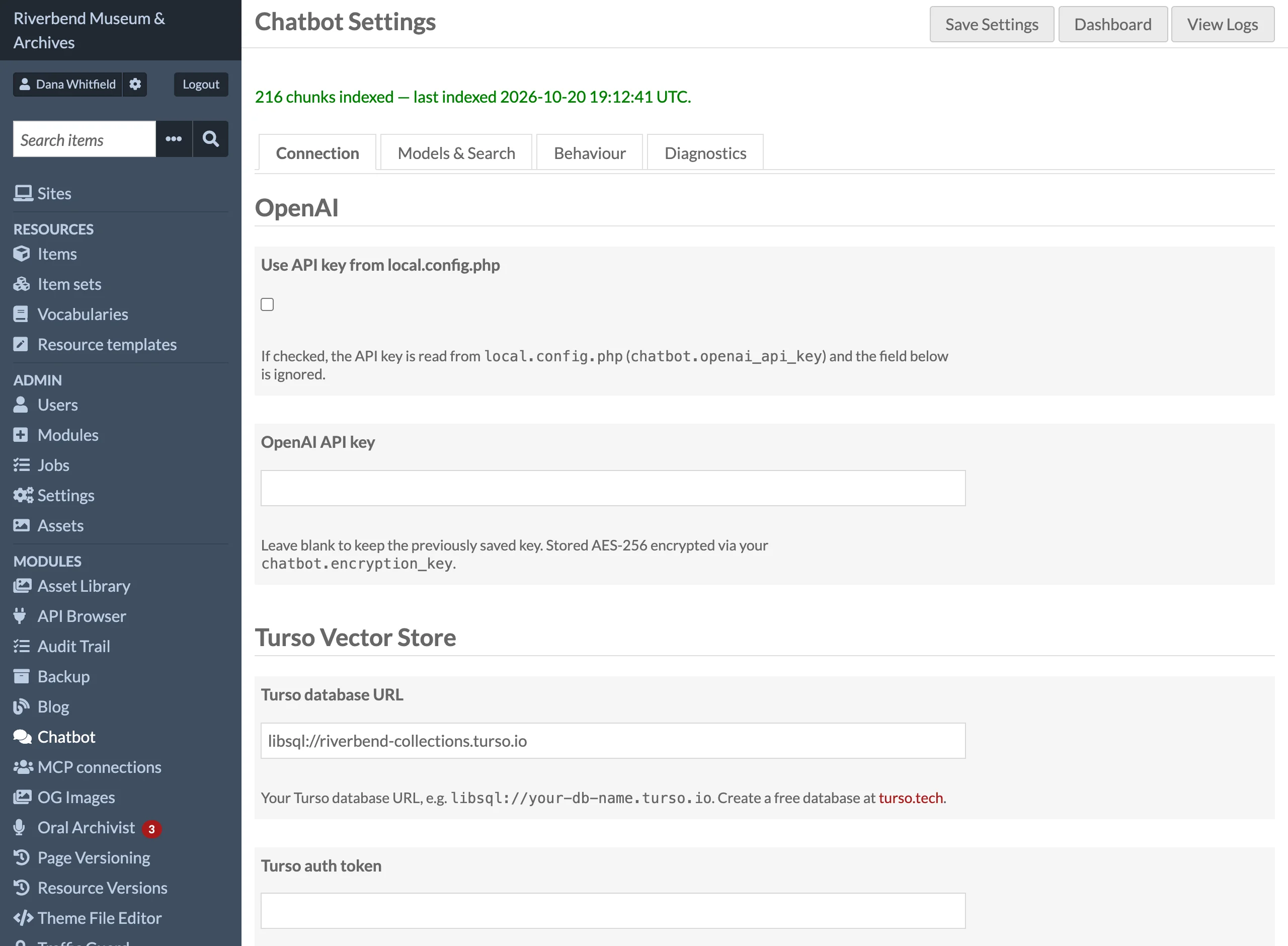
| Setting | Default | Description |
|---|---|---|
| Use API key from local.config.php | unchecked | Informational. The module always uses chatbot.openai_api_key from local.config.php when it is set, and only falls back to the key saved below when it is not. |
| OpenAI API key | none | Stored AES-256-CBC encrypted with chatbot.encryption_key. |
| Turso database URL | none | libsql:// or https:// URL of your Turso database. |
| Turso auth token | none | Token from the Turso dashboard or turso db tokens create. |
Models & Search
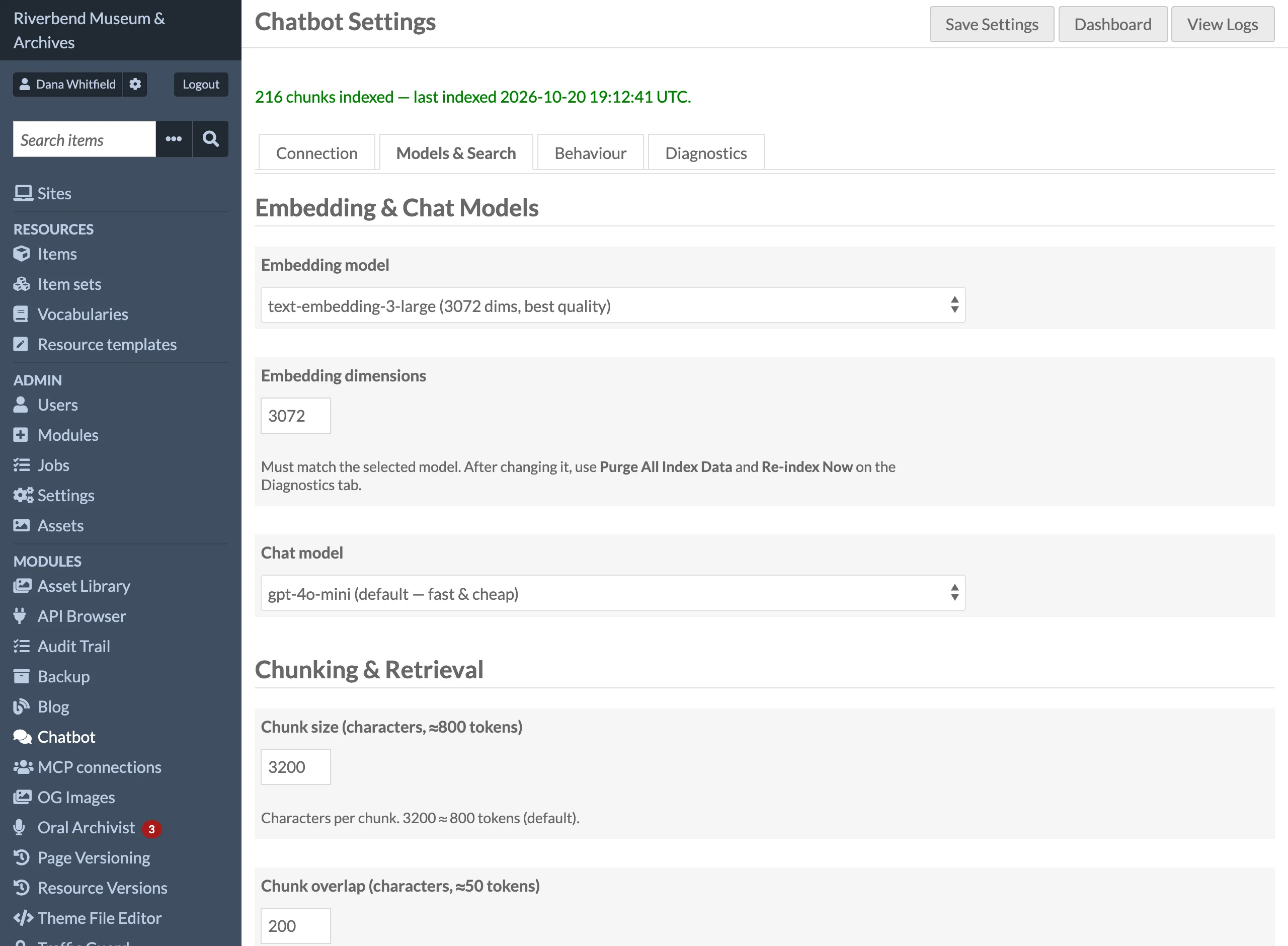
| Setting | Default | Description |
|---|---|---|
| Embedding model | text-embedding-3-large | OpenAI embedding model. text-embedding-3-small (1536 dimensions) is faster and cheaper. |
| Embedding dimensions | 3072 | Vector size requested from OpenAI and used for the Turso vector column. 256 to 3072; must suit the model. Changing it requires Purge All Index Data and a full re-index. |
| Chat model | gpt-4o-mini | Model that writes answers: gpt-4o-mini, gpt-4o, gpt-4-turbo or gpt-3.5-turbo. Requests use temperature 0.2 and a 1024-token answer limit. |
| Chunk size (characters, ≈800 tokens) | 3200 | Characters per indexed chunk. Values below 500 are raised to 500 at index time. |
| Chunk overlap (characters, ≈50 tokens) | 200 | Characters shared between consecutive chunks. Capped at half the chunk size. |
| Top-K results to retrieve | 5 | Chunks given to the chat model as evidence (1 to 20). Semantic search fetches its own, larger set. |
| Item set filter | none (all items) | When item sets are selected, only items in at least one of them are indexed. Other items, and their media, are skipped and any chunks they already have are removed. An item taken out of the selected sets loses its chunks and its media's when it is saved, even with auto-indexing off; one put into them is queued with its media when auto-indexing is on, and otherwise waits for a re-index. Changing the filter re-indexes nothing: run Re-index Now. Does not affect blog posts or site pages. |
Behaviour
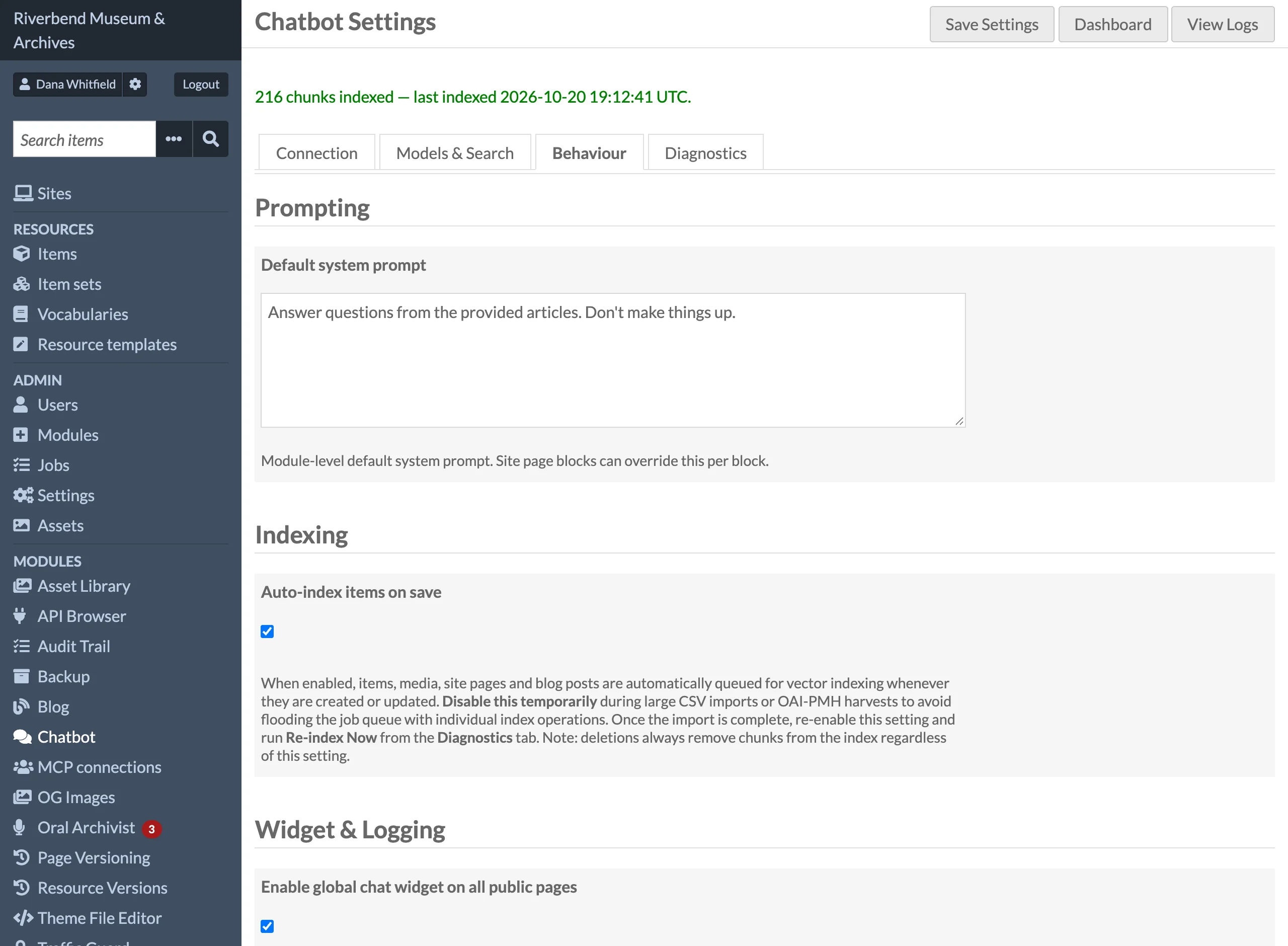
| Setting | Default | Description |
|---|---|---|
| Default system prompt | empty | System prompt for every chat request. Empty means the built-in prompt below. A Chatbot block can override it. |
| Auto-index items on save | checked | Queue an index job whenever a public item, media, site page or blog post is created or updated. Deletions, and resources made private, unpublished or restricted by the Access module, always remove chunks, even when this is off. A change to an item's sites or item sets is always copied into its stored chunks (no re-embedding). |
| Enable global chat widget on all public pages | unchecked | Inject the floating chat button on every public site page. |
| Widget heading | empty | Title at the top of the floating widget panel. Empty means "Ask our collection". |
| Log level | info | Minimum severity written to the module log: debug, info, warning or error. The dashboard needs info to see chat and search activity. |
| Log retention (days) | 90 | Age after which Purge Old Logs Now deletes log entries. 0 keeps logs forever and disables the purge button. |
The built-in system prompt is:
You are an assistant that answers questions using only the provided evidence. If the answer is not contained in the evidence, say 'I don't know.' Always include citations in the format [N] referring to the numbered evidence items.
Diagnostics
The fourth tab holds actions rather than settings: Re-index Now with content type checkboxes, Remove Non-Public Chunks, Purge All Index Data, Run Test Search (which shows only what visitors would get, and counts the rest as hidden) and Purge Old Logs Now. See Indexing Content and Dashboard and Logs.
The Access module
There is nothing to configure. When the Access module is installed and active, items and media whose files it keeps from anonymous visitors (a level other than free, or an embargo) are not indexed and not used in answers or search; with Access absent or switched off, only Omeka's visibility counts. Access's Bypass embargo dates for reserved resources setting is honoured: with it on, embargoes are ignored, as Access ignores them. See Restricted files and embargoes.
local.config.php keys
Add these under a 'chatbot' key in config/local.config.php.
| Key | Default | Description |
|---|---|---|
encryption_key |
fixed built-in fallback | Secret used to encrypt the OpenAI API key at rest. Always set it. |
openai_api_key |
unset | OpenAI key read from the file instead of the database. Takes priority whenever set. |
sync_jobs |
false | When true, index, bulk re-index and log purge jobs run inside the web request instead of through Omeka's job queue. For local development only. |
Settings without a form field
Two settings are read from Omeka's global settings table but have no field in the form. They keep their defaults unless changed through the Omeka settings service, for example from another module or a script.
| Setting key | Default | Description |
|---|---|---|
chatbot_rate_limit_max |
10 | Requests allowed per client IP address per window, shared by the chat and search endpoints. |
chatbot_rate_limit_window |
60 | Window length in seconds. |
Permissions
| Role | Chat and search on public sites | Dashboard, logs, CSV export | Settings, re-index, purge | Run Test Search |
|---|---|---|---|---|
| Anonymous visitor | ✓ | — | — | — |
| Researcher, Author, Reviewer | ✓ | — | — | — |
| Editor | ✓ | ✓ | ✓ | ✓ |
| Site Admin | ✓ | ✓ | ✓ | ✓ |
| Global Admin | ✓ | ✓ | ✓ | ✓ |
The chat and search endpoints are public and protected by per-IP rate limiting rather than by login. The Chatbot sidebar entry, and the Re-index batch actions on the items browse page, are only shown to roles that can open the dashboard; other users who open a Chatbot admin page get Omeka's Forbidden page (HTTP 403). Before 1.5.4 those pages refused nobody who was signed in. A Chatbot page block whose Allow anonymous users option is unchecked shows a login link instead of the panel to visitors who are not logged in; see Chat Widget and Block.