The chatbot and semantic search answer from a vector index stored in your Turso database. This page explains what goes into the index and how to keep it current.
What is indexed
Only public content is indexed: see Private content, and Restricted files and embargoes for sites using the Access module.
| Content | Text used | Conditions | Link shown in results |
|---|---|---|---|
| Items | Title plus every literal and URI property value | The item is public. Skipped when an Item set filter is set and the item is in none of the selected sets | /s/{site}/item/{id} |
| Media | Title (the file name or source when the media has no title) plus the literal and URI property values of the media record | The media and its item are public. Skipped when an Item set filter is set and the media's item is in none of the selected sets | The parent item's page |
| Site pages | Page title plus the text of every block, as Omeka's own full-text indexing extracts it | The page and its site are public | /s/{site}/page/{slug} |
| Blog posts (Blog module) | Title, excerpt and content with HTML removed | Status published and assigned to at least one public site. A post scheduled for a later date is indexed but only shown once that date has passed |
/s/{site}/blog/post/{slug} |
Media file contents (PDF text, transcripts and so on) are not read. Only the metadata values on the media record are indexed.
Each resource's text is split into chunks of Chunk size characters, with Chunk overlap characters shared between neighbours. Every chunk is sent to OpenAI for an embedding and stored in Turso together with the resource type, id, title, URL and the ids of the sites the resource belongs to (and, for items and media, of the item's item sets). Resources with no text are skipped.
Site membership matters. Chat and search on a site only return chunks whose resource belongs to that site. An item that is in no site is stored with an empty site list, links to its page on the installation's first site, and never appears in site-scoped results.
When an item's sites or item sets change in its form, through the API or in a batch edit, its chunks and its media's get the new lists, and the new site in their link, at once: the stored chunks are updated in place, without re-embedding, whether or not auto-indexing is on. Items added to or removed from a site on the site's Resources page are changed without item saves, so re-index them afterwards (see Re-indexing selected items).
Automatic indexing
With Auto-index items on save enabled (the default), the module listens for create, update and delete events on items, media, site pages and blog posts:
- A create or update of a public resource queues an
IndexItemJobbackground job. The job removes the resource's old chunks and embeds the new text; Turso updates the vector index as the chunks are written. - A delete, or a save that leaves the resource not public (see Private content), removes its chunks from Turso immediately, in the same request, whether or not auto-indexing is enabled.
- A save that changes an item's sites or item sets updates them in its chunks and its media's straight away (see What is indexed), whether or not auto-indexing is enabled.
- With an Item set filter set, a save that takes an item out of all the selected sets removes its chunks and its media's at once, whether or not auto-indexing is enabled. A save that puts it back in one of them queues the item and its public media; with auto-indexing off they wait for a re-index (see Re-indexing selected items), since indexing costs embeddings. Changing the filter itself on the settings page re-indexes nothing: run Re-index Now.
Saving an item also covers the media changed in its own form, which fire no media events: media added there, or made public, are queued; media removed or made private there lose their chunks. Deleting an item removes its media's chunks too. Batch edits and batch deletes are handled item by item in the same way. Each resource is queued at most once per save.
Jobs are only queued when Turso is reachable; otherwise the save completes normally and nothing is indexed. Failures are written to the module log under the dispatch.error, index.embed and index.problem events. While the settings page reports Index needs rebuilding, jobs stop before calling OpenAI.
Turn auto-indexing off before a large CSV import or OAI-PMH harvest so the job queue is not flooded with one job per record, then turn it back on and run a full re-index.
Re-indexing everything
- Open Admin > Chatbot > Settings and select the Diagnostics tab.
- Under Content types to re-index, tick Items, Media, Blog Posts and/or Pages. All four are ticked to begin with, matching what automatic indexing covers.
- Click Re-index Now and confirm.
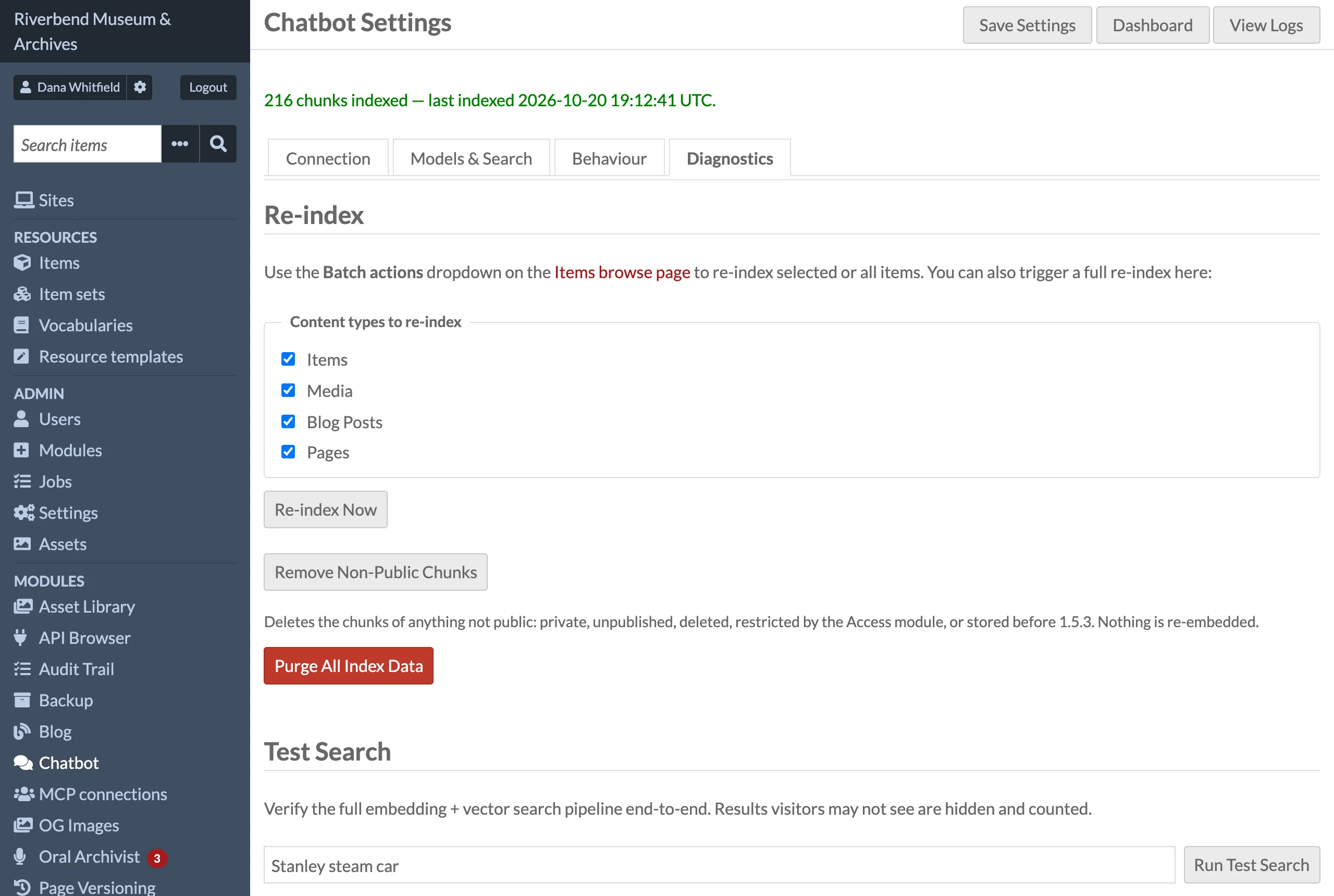
A BulkIndexJob is dispatched. For each selected type it first deletes every existing chunk of that type, then indexes the public resources (items in pages of 100, honouring the Item set filter; media through their items, so the filter applies to them too). Resources it skips (restricted by the Access module, for example) cost no Turso request, since their chunks were just deleted. If the index needs rebuilding (a damaged index, or an embedding size that no longer matches the settings), the job stops with an error before deleting anything; purge the index first. The success message links to the job in Admin > Jobs; per-resource failures appear in the job log and in the module log.
Every media record is embedded, by its file name when it has no metadata, so ticking Media on a collection with many files adds about one OpenAI embedding per file.
The job checks for a stop request between resources, so it can be stopped from the Jobs page. A stopped run has already deleted the old chunks of that type, so run it again to completion.
Re-indexing selected items
- Go to Admin > Items.
- Tick the items you want to refresh.
- In the Batch actions dropdown choose Re-index selected and click Go.
The same dropdown has a Re-index all option that queues a full re-index of items after a confirmation. Both options index the items and their media; blog posts and pages are re-indexed from the Diagnostics tab.
Private content
Chat and search only use content that Omeka shows the public: what counts is the Public / Private setting of items, media, pages and sites, and a blog post's status and sites. With the Access module, its access levels and embargoes count too: see Restricted files and embargoes. Other modules that restrict access are not consulted.
- Indexing leaves out private items, private media and the media of private items, private pages and the pages of private sites, and blog posts that are not published or not assigned to a public site.
- Changes take effect at once, even with auto-indexing off. Making an item private removes its chunks and its media's; making a media record, page or site private, unpublishing a post, or deleting any of them, removes their chunks. A site made private takes its pages with it, and its blog posts unless they are also on another public site. When a private site is made public again, its public pages and posts are queued for indexing.
- Chat and search check every passage they retrieve against the database before using it (one query per question) and drop any whose resource is not public now, including a blog post scheduled for later. This also covers chunks stored before a change reached the index.
Versions before 1.5.3 indexed private items and media too. After upgrading, the settings page shows Content visitors cannot see may still be stored in the index until you click Remove Non-Public Chunks on the Diagnostics tab. That button dispatches a PruneIndexJob, which reads which resources have chunks in Turso, checks them in MySQL and deletes the chunks of everything that is private, unpublished, restricted by the Access module or no longer exists. It embeds nothing, so it makes no OpenAI calls. A full Re-index Now with all four content types ticked has the same effect, at the cost of re-embedding everything.
Restricted files and embargoes
When the Access module (by Daniel Berthereau) is installed and active, the chatbot also follows the access level and embargo Access gives each item and media, as Access applies them after inheritance (item set, then item, then media). Access shows visitors the record but keeps its files from them. The chatbot leaves such items and media out whole: their metadata often holds text taken from the files (extracted text, transcripts), and an answer would send visitors to files they cannot open.
| Access level and embargo | Indexed | Used in chat and search |
|---|---|---|
| Free, no embargo | Yes | Yes |
| Reserved, protected or forbidden | No | No |
| Free, embargo with an end date | Yes, in advance | Not from the start date (if any) to the end date; then automatically |
| Free, embargo with a start date and no end | Until the start date | Until the start date |
- A media follows its own status and its item's: a media of a restricted or embargoed item is left out too.
- Reserved is left out although Access opens it to some visitors (an IP range, guest accounts, approved requests): the chatbot answers every visitor alike.
- With Access's Bypass embargo dates setting on, embargoes are ignored, as Access ignores them.
- With Access not installed, or installed but switched off, nothing changes: only Omeka's own visibility counts.
When a restriction changes:
- In the item's or media's own form, or through the API: handled at the save, like making it private. Restricted, its chunks (and an item's media's) are removed at once, whether or not auto-indexing is on. Lifted, the item and its media are queued for indexing (with auto-indexing on).
- When an embargo with an end date ends: nothing to do. The content was indexed in advance, and chat and search start using it once the end date has passed.
- Changes Access makes without saving each item: a level or embargo set on an item set (its items inherit it), a batch edit of access levels, the daily embargo task when Update access level when embargo ends lifts the level, and the Rebuild access index task. Newly restricted content is hidden at once, since chat and search check every passage, and Remove Non-Public Chunks deletes its chunks. Content these changes open up is indexed on its next save; to index it now, select the items and use Re-index selected, or run Re-index Now.
After upgrading to 1.5.4 on an installation where Access is active, the settings page asks you to run Remove Non-Public Chunks once, since earlier versions indexed restricted items and media.
Purging the index
Remove Non-Public Chunks on the Diagnostics tab deletes only the chunks of resources that are not public now (see Private content and Restricted files and embargoes).
Purge All Index Data on the Diagnostics tab drops the chunks table in Turso and recreates it empty with the current Embedding dimensions. Use it after changing the embedding model or dimensions, or to start over. Run Re-index Now afterwards.
Checking the index
The settings page header shows how many chunks are indexed and when the last one was written. Run Test Search on the Diagnostics tab embeds a query and lists the closest chunks with their distance, which is the quickest way to confirm the pipeline end to end. It checks them as chat and search do, so it lists what visitors would get: chunks whose resource is not public now are left out, and counted on a Hidden, not public line. See Dashboard and Logs.
Running jobs synchronously
For local development, add this to config/local.config.php:
'chatbot' => ['sync_jobs' => true],
Automatic index jobs, bulk re-index and log purge then run inside the web request instead of through Omeka's job queue, and the settings page reports "completed (ran synchronously)". Do not use this on a production site: a full re-index can take longer than a web request allows.