The plugin settings decide what happens to announcements after they expire. Open them with Configure next to Announcements on the Plugins page (Super Users only).
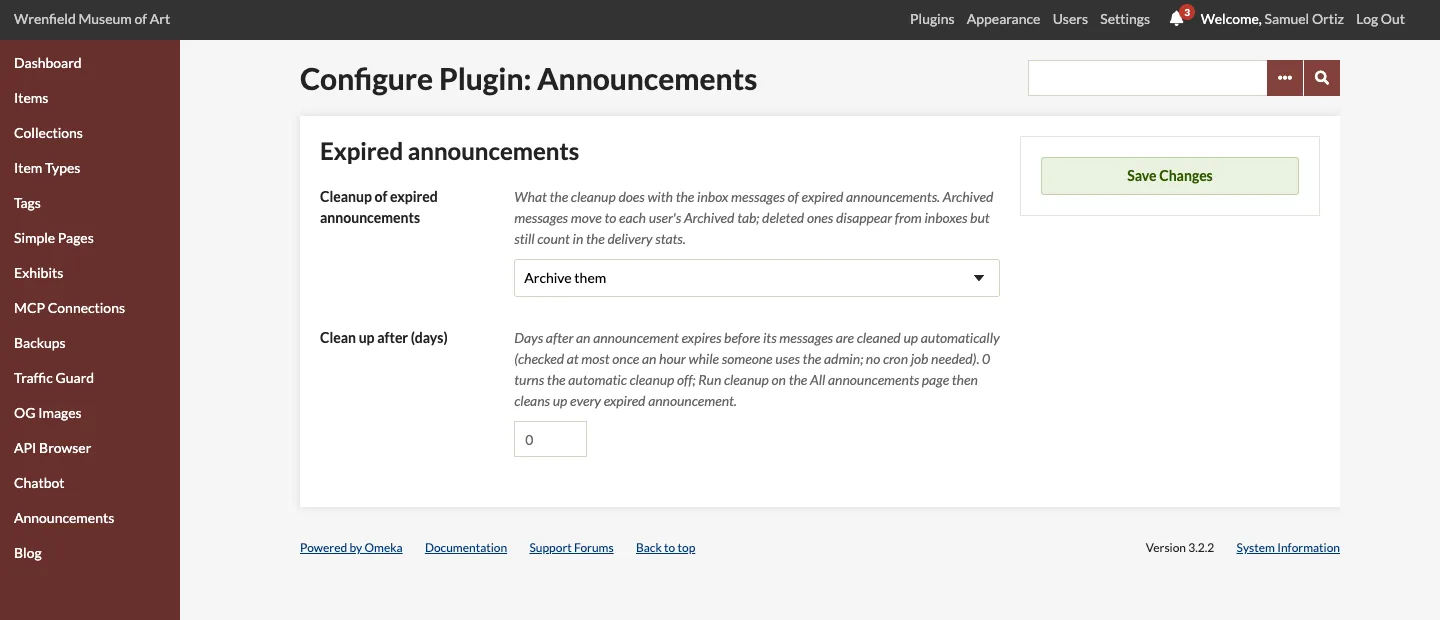
Settings
| Setting | Default | Description |
|---|---|---|
| Cleanup of expired announcements | Archive them | What the cleanup does with the inbox messages of expired announcements. Archive them moves them to each user's Archived tab. Delete them from inboxes removes them from inboxes; they still count in the announcement's delivery stats. |
| Clean up after (days) | 0 | How many days after an announcement expires its messages are cleaned up automatically. The check runs at most once an hour while someone is using the admin, so no cron job is needed. 0 turns the automatic cleanup off. |
Run cleanup at the bottom of Announcements > All announcements runs the same cleanup straight away. It handles announcements that expired more than Clean up after days ago, or every expired announcement when that setting is 0. See Recall, Expiry and Cleanup.
Email choice
Each user decides whether they receive announcement emails. The choice is at the bottom of their inbox, under Announcement emails: Stop announcement emails turns them off, Receive announcement emails turns them back on. Emails are on by default. Turning them off stops the emails only; announcements still arrive in the inbox.
Permissions
| Role | Own inbox, bell and dashboard panel | Browse and read all announcements | Send, recall and run cleanup | Plugin settings |
|---|---|---|---|---|
| Researcher | ✓ | — | — | — |
| Contributor | ✓ | — | — | — |
| Admin | ✓ | ✓ | ✓ | — |
| Super | ✓ | ✓ | ✓ | ✓ |
The Announcements menu entry opens the user's own inbox. The All announcements and New announcement tabs appear only for Admins and Super Users. Anyone who opens a page their role does not allow gets Omeka's Forbidden page (HTTP 403). The settings are on the Plugins page, which only Super Users reach.
Only users with one of these four roles receive announcements. Accounts with other roles, such as the Guest role of the Guest User plugin, never do: they cannot use the admin.
Times and time zone
Expiry dates are entered, and all dates are shown, in the site's time zone. Omeka Classic has no time zone setting of its own: it uses PHP's (date.timezone in php.ini), and the New announcement form names it beside Expires. Times are stored in UTC, so a change of time zone moves how they are displayed, not when they expire.