The browser needs no configuration. Two settings change what it does: Omeka's own REST API settings, and the resources the public browser documents.
The REST API
In Settings > API (Super Users):
| Setting | Effect on the browser |
|---|---|
| Enable API | Off: requests answer 403 API is disabled, as /api does, and there is no public browser. The documentation and OpenAPI file still show in the admin. |
| Results per page | The most results a page of a search returns. per_page above it is ignored. |
The public browser
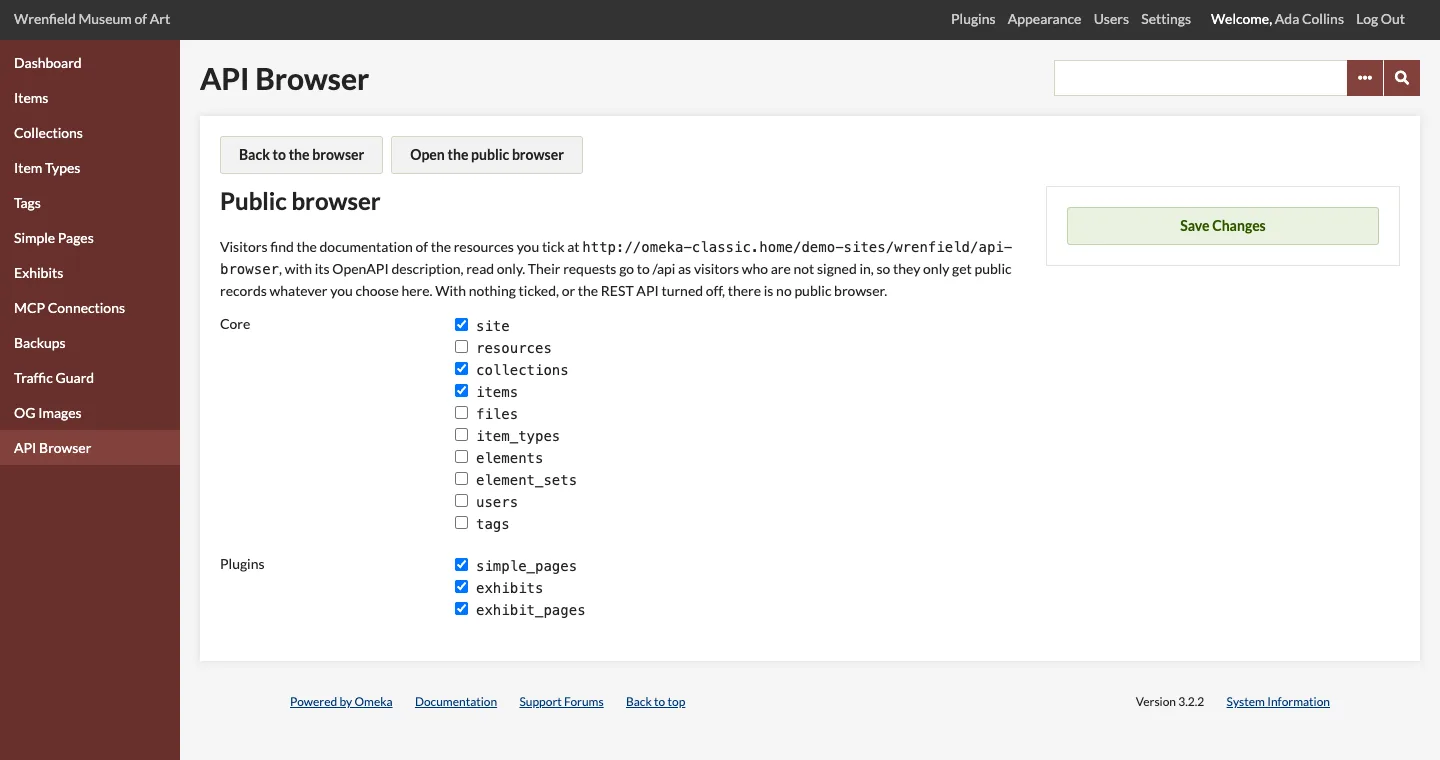
Click Public browser at the top of the API Browser (Super Users and Admins). Tick the resources to document publicly and click Save Changes.
| Setting | Effect |
|---|---|
| Resources ticked | Shown at /api-browser and in /api-browser/openapi.json, read only. |
| None ticked (as installed) | There is no public browser: its addresses answer 404. |
What you tick changes documentation only. The API itself decides what visitors can read, whatever you choose here: public records, never private ones.
Permissions
| Role | Browse the reference and the OpenAPI file | Send requests | Public browser settings |
|---|---|---|---|
| Researcher, Contributor | ✓ | ✓ | — |
| Admin, Super User | ✓ | ✓ | ✓ |
| Visitor | Public browser only | Public browser, read only | — |
Requests run with your own permissions, so the browser never lets anyone do more than they can in the admin. A Contributor can create items and change their own, and gets 403 Permission denied. changing someone else's. The operations listed for each resource are those your role can use.