API Browser can publish a read-only reference of your API for developers without an account on your site.
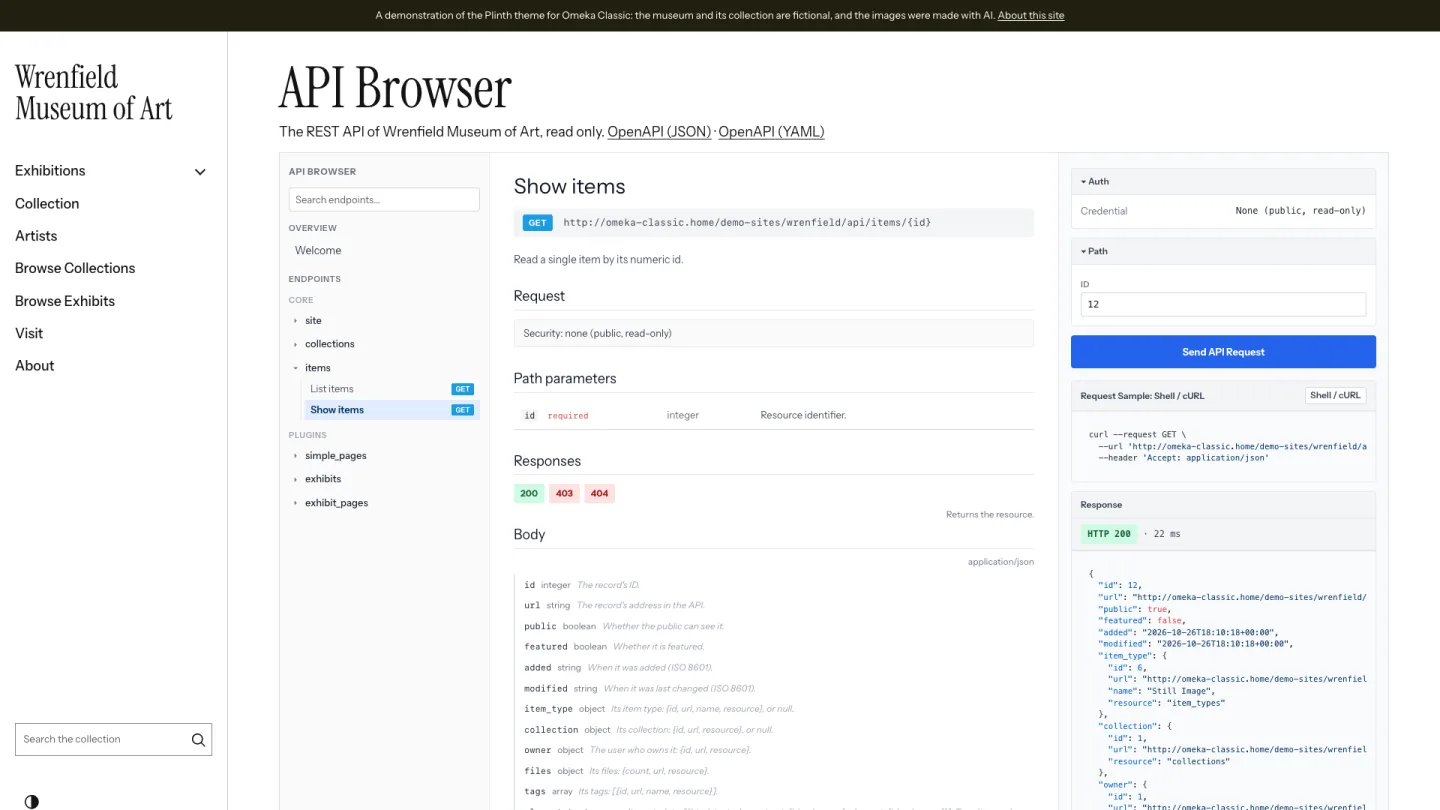
Turning it on
- Make sure the REST API is on (Settings > API).
- In API Browser, click Public browser (Super Users and Admins).
- Tick the resources to document and click Save Changes.
With nothing ticked, or the REST API off, there is no public browser: its addresses answer 404.
Where it is
| Page | Address |
|---|---|
| Public browser | /api-browser |
| OpenAPI (JSON) | /api-browser/openapi.json |
| OpenAPI (YAML) | /api-browser/openapi.yaml |
The browser is shown in your public theme, with the site's header and footer.
What visitors see
- The resources you ticked, and only their List and Show operations.
- The same reference as the admin: parameters, the keys of the JSON, and examples from public records only.
- Code samples without a key.
- Send API Request, which sends the request from their browser straight to
/apias a visitor who is not signed in.
Ticking a resource does not change who can read it. The API answers visitors with public records only: private items and collections, private exhibits and users are refused or left out, whatever is ticked.