On a work's page, Plinth hangs the work on its wall and puts its wall label beside it, the way a museum does. These are the Item pages and Exhibits settings on the theme's settings page (Appearance › Themes › Configure Theme).
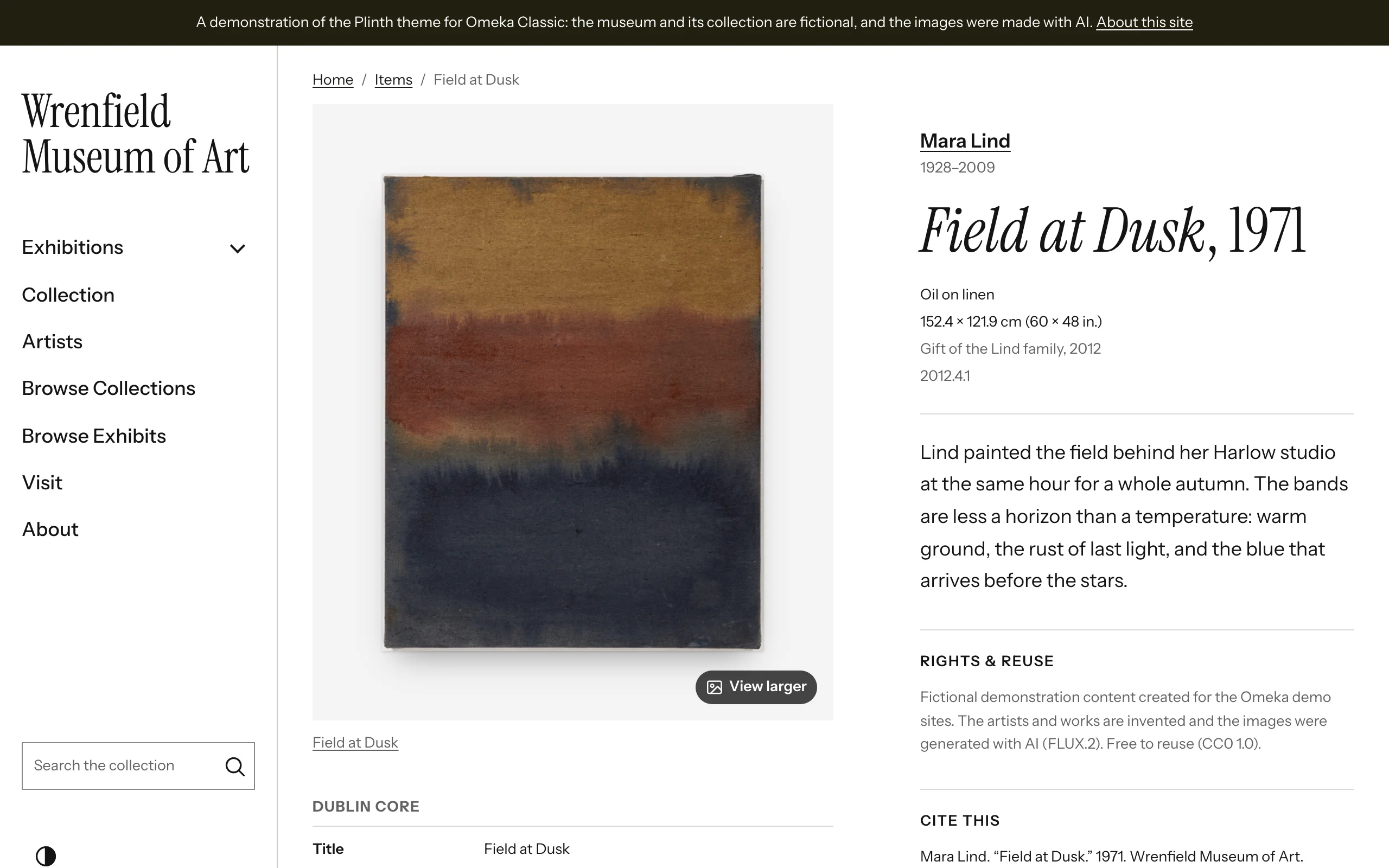
Plinth's item pages
| Place | What it holds |
|---|---|
| The wall | The work, large and whole, hung as Artworks › How works are hung asks; more images as thumbnails under it |
| Beside the work | The wall label, then the item's panels: rights and reuse, citation, collection, subjects and tags, sharing and downloads, as you choose below |
| Under the work | The item's full record, compact, like a catalogue entry |
| At the foot | Previous and next links through the item's collection, then an artist's works and what plugins add |
When the page shows a work and its wall label, the label is the page's visible title: the page keeps its heading for screen readers and search engines. Without a label, the usual title returns, and the record comes before the panels.
| Setting | What it does |
|---|---|
| Item page layout | Label on the right (the default), Label on the left, or Label below the work. Beside a side rail, the label goes below the work until the window is 1280 pixels wide; with a top bar, from 1024 pixels. On phones it always follows the work. |
| Files on item pages | Gallery: one large file, with thumbnails of the others. Grid: all files at the same size. Each file at full width, one after another. Thumbnails keep each work's shape. |
| Wall label | On by default. The caption beside the work (see below). |
| An artist's works | On by default. On an artist's page, their works as a grid (see below). |
| Previous and next links through the item's collection | On by default. |
| Rights & reuse, Cite this, Share | Panels beside the work, on by default. |
| Downloads | Links to each file's original, with its format and size. Off by default. |
| Subject and tag links | The item's subjects and tags as links to other works with the same ones. On by default. |
| Shorten long value lists | Elements with more values than this show the first few and a "Show all" button. 0 always shows every value. |
Describing works for their labels
The wall label reads Dublin Core elements and leaves out any line without a value:
| Line | Element | Example |
|---|---|---|
| Artist | Creator | Mara Lind |
| Artist's dates | Date, on the artist's own item | 1928–2009 |
| Title and date | Title, Date | Field at Dusk, 1971 |
| Medium | Medium | Oil on linen |
| Dimensions | Extent | 152.4 × 121.9 cm (60 × 48 in.) |
| Credit line | Provenance | Gift of the Lind family, 2012 |
| Number | Identifier | 2012.4.1 |
| Label text | Abstract, else the first Description |
Medium, Extent, Provenance and Abstract come with the Dublin Core Extended plugin: install it to fill in the whole label. Screen readers hear each detail line with its element's name ("Medium: Oil on linen").
Artists' pages
Give each artist an item of their own, of the item type Person, with their name as its Title, their dates as its Date, a short biography as its Description and, if you have one, a portrait as its file. Write the name the same way in each work's Creator: Omeka Classic has no links between items, so the name is the link. The artist's name in a wall label then links to their page, with their dates under it.
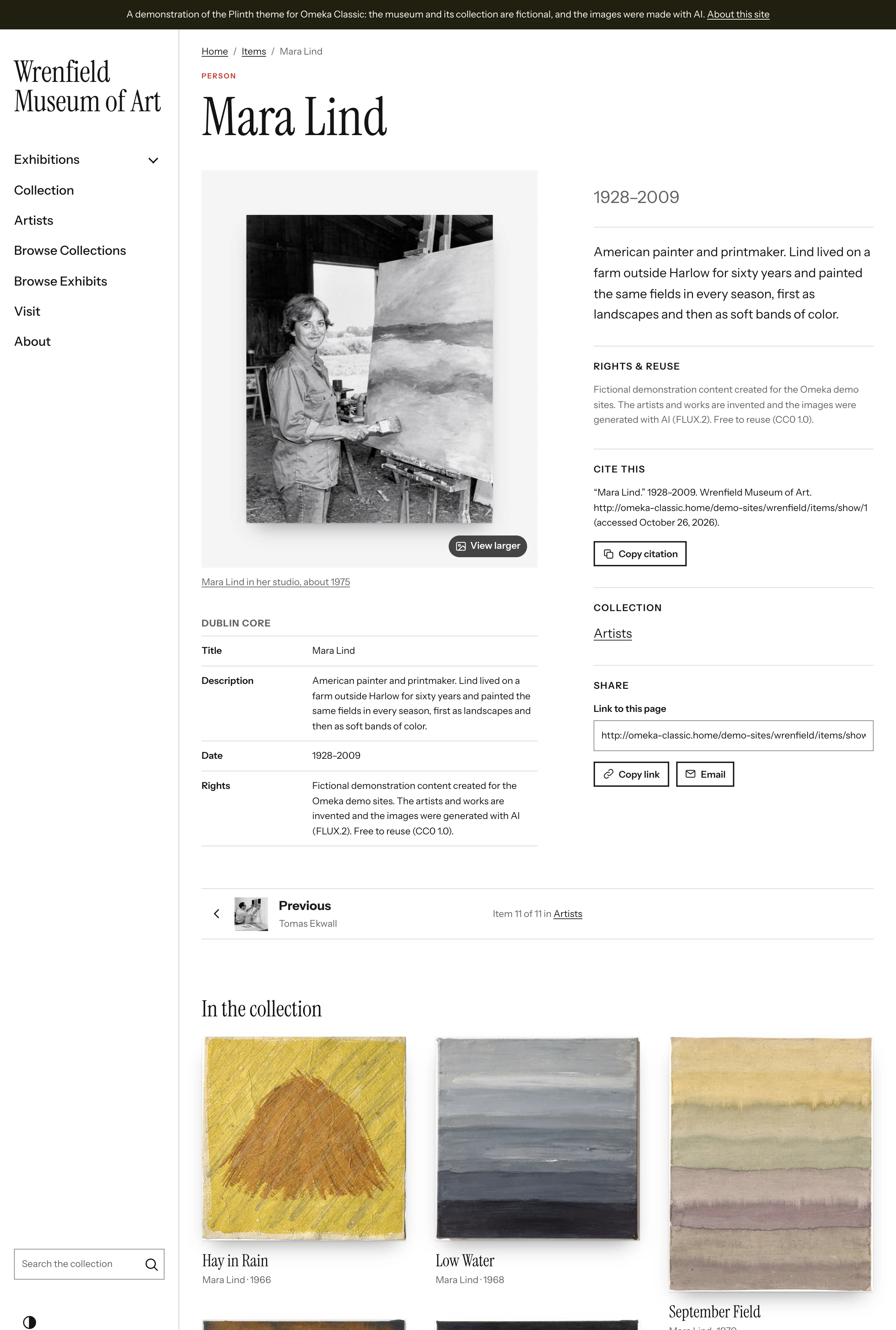
On an artist's page, the page title names them, their portrait hangs on the wall like a work, and the label beside it shows their dates and biography. An artist's works lists every item whose Creator is their name, as a grid headed "In the collection", in order of date: up to 24, with a link to see them all. Items of the item types Organization or Agent work the same way, for a studio or a collective.
Exhibits
| Setting | Choices |
|---|---|
| Exhibit navigation | The exhibit's table of contents beside each page, in a menu above it, or only previous and next links |
| Exhibit cover | Large banner with the title: the cover hangs as a work, whole on its wall, with the exhibit's label beside it. Beside the description, or Not shown. |
The works in an exhibit's File, File with Text and Gallery blocks are hung like the works in your grids, with the block's text beside them like a label; a gallery with only a heading for its text shows the heading as its title, above it. A page whose first block opens with a banner (the v-hero content class) shows it in place of the page's title. See Exhibits.