The blog is at /blog as soon as the plugin is installed. This page covers the link to it, its pages, the lists of posts you can put elsewhere, and changing its look in your theme.
The link in the navigation
Installing the plugin adds a link to the blog at the end of the site's main navigation, labelled with the blog's Title (Blog > Settings). Under Appearance > Navigation you can untick it to hide it, drag it elsewhere, or rename it; once you save that page, its label there is the one shown.
The public pages
| Page | Address |
|---|---|
| Blog home | /blog, then /blog?page=2… |
| A post | /blog/<address> |
| A category | /blog/category/<address> |
| A tag | /blog/tag/<address> |
| An author | /blog/author/<user number> |
| Preview (signed in) | /blog/<address>/preview |
The blog home has the blog's title and description, post summaries (featured image, title, author, date, category and tags, excerpt and Read more) with your theme's pagination, and a sidebar with the categories, the tags and the feeds. The category, tag and author pages list their posts the same way; an author's page shows their bio and picture.
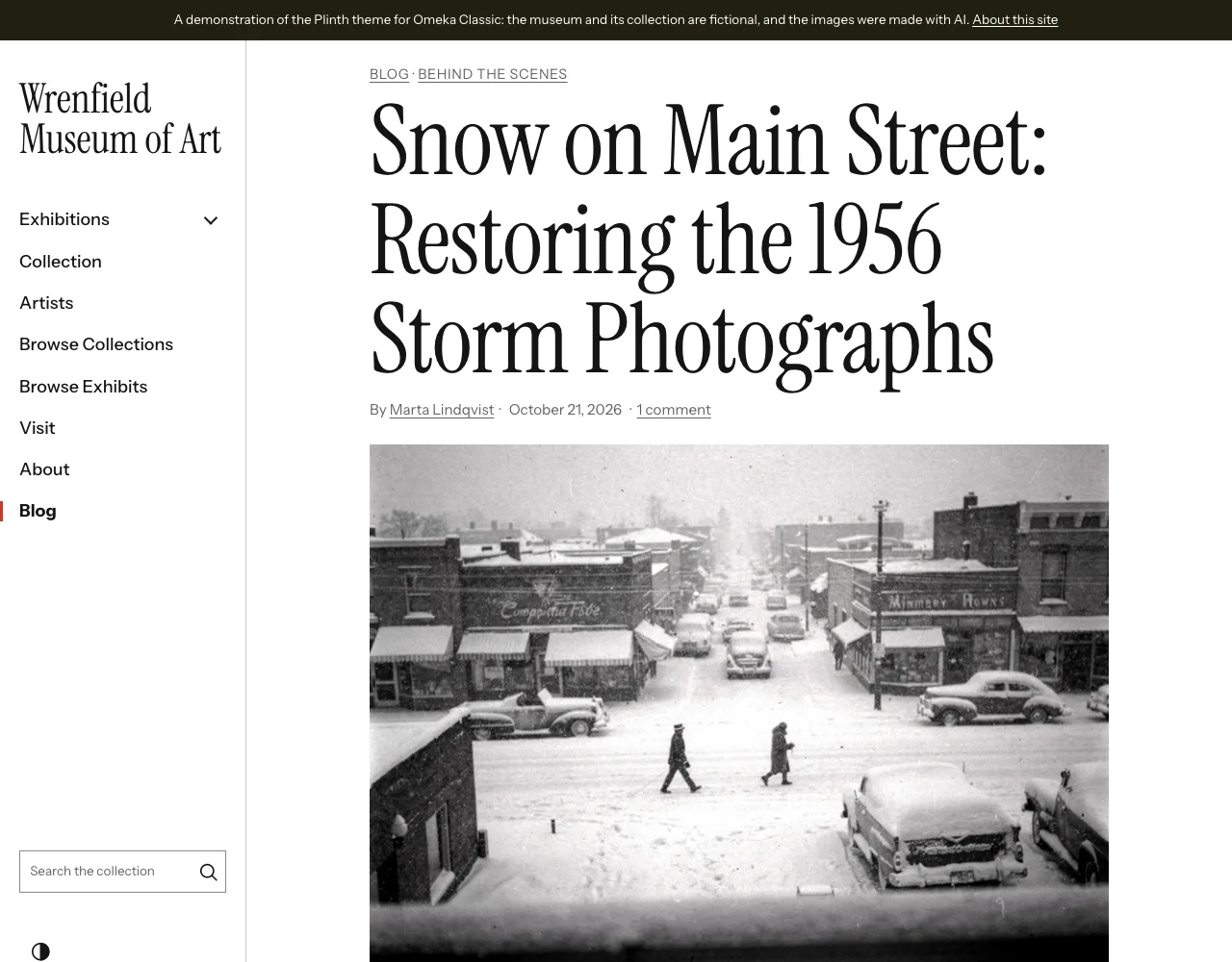
A post page shows its category, title, author and date, the featured image with a link to its item, the text, the tags, About the author, up to three more posts by the same author, and the comments with the form. Images in the text and the featured image open full screen when clicked (or with Enter); close with the button, a click outside or Escape.
The pages take their colours, type and buttons from the theme: they follow the RefBytes themes (Plinth, Vitrine, Confetti and Overprint), light and dark, and work in Omeka's own themes.
Posts on other pages
The [blog_posts] shortcode
Put the latest posts on a simple page (or anywhere Omeka runs shortcodes):
[blog_posts]
[blog_posts num="4" layout="grid" heading="From the archive" category="from-the-archive"]
[blog_posts layout="compact" tag="photographs" show_image="0" link_text=""]
| Option | Default | Description |
|---|---|---|
num |
3 |
How many posts, 1 to 20. |
heading |
none | A heading above the posts, linking to the blog (or to the category's or tag's page). |
layout |
list |
list (summaries with images beside), grid (cards) or compact (titles, small images). |
category |
all | A category's address or number. |
tag |
all | A tag's address or name. |
author |
all | A user's number. |
show_image, show_excerpt, show_date, show_author, show_category |
1 |
0 to leave each out. |
show_tags |
0 |
1 to show the tags. |
link_text |
All posts |
A link after the posts to the blog (or the category's or tag's page). "" for none. |
The Blog Posts block for exhibits
In an exhibit page, add a block and choose the Blog Posts layout. Its text appears above the posts, and its Layout Options are the same as the shortcode's: heading, number of posts, layout (cards in a grid by default), category, tag, what to show, and the link to all posts.
Both replace the Omeka S module's Blog Posts page block. They show only published posts.
Changing the templates in your theme
The plugin's templates can be copied into your theme and changed there. Omeka uses a theme's copy when there is one.
| Template | In your theme | Shows |
|---|---|---|
views/public/index.php |
themes/<theme>/blog/index.php |
the blog home |
views/public/show.php |
themes/<theme>/blog/show.php |
a post and its preview |
views/public/archive.php |
themes/<theme>/blog/archive.php |
category, tag and author pages |
views/public/post-list.php |
themes/<theme>/blog/post-list.php |
the post summaries of those pages |
views/public/sidebar.php |
themes/<theme>/blog/sidebar.php |
categories, tags and feeds |
views/public/author-box.php |
themes/<theme>/blog/author-box.php |
About the author |
views/public/comments.php |
themes/<theme>/blog/comments.php |
the comments and the form |
views/shared/blog/recent-posts.php |
themes/<theme>/blog/recent-posts.php |
the shortcode's and block's list |
Each template lists the variables it receives at its top. The post templates get records: $post is a BlogPost, with $post->getPublicUrl(), getAuthorName(), getCategory(), getTags(), getFeaturedImage() (an array with url and alt), isScheduled() and the fields title, slug, excerpt, content, published_at. Blog\Text::summary($post->excerpt, $post->content) makes the plain summary the lists show.
If you copy comments.php, keep the names of the fields, the hidden blog_website field and the blog_token field, or comments are refused.
Styling
The blog's stylesheet is views/shared/css/blog.css; every rule is scoped to blog- classes. Its colours come from the --theme-* tokens the Theme Engine themes define, with light fallbacks for other themes. You can set the blog's own variables in your theme's stylesheet:
:root {
    --blog-accent: #2b5f8a;        /* buttons (from --theme-primary) */
    --blog-on-accent: #fff;        /* text on buttons (--theme-on-primary) */
    --blog-link: #2b5f8a;          /* (--theme-link) */
    --blog-bg: #fff;               /* post summaries (--theme-surface) */
    --blog-surface-alt: #f4f3f0;   /* sidebar, author box, category pills (--theme-surface-alt) */
    --blog-text: #222;             /* (--theme-text) */
    --blog-muted: #5c5f66;         /* dates and notes (--theme-text-muted) */
    --blog-border: #dedcd7;        /* (--theme-border) */
    --blog-border-strong: #858991; /* form fields and tag pills, 3:1 or more (--theme-border-strong) */
    --blog-radius: 4px;            /* (--theme-radius) */
}
The Accent colour setting overrides --blog-accent (and sets --blog-primary-color). Keep text at 4.5:1 contrast or more against its background.
Useful classes: .blog (each page), .blog-layout with .blog-layout__main and .blog-sidebar, .blog-summary, .blog-pill and .blog-pill--category, .blog-button, .blog-post with .blog-post__content, .blog-author, .blog-more, .blog-comments, .blog-comment-form, .blog-preview-banner, .blog-posts-block with --list, --grid or --compact. A theme can also replace the whole stylesheet with its own themes/<theme>/blog/css/blog.css (blog pages) or themes/<theme>/css/blog.css (other pages).