The settings live under Oral Archivist > Settings, for Super Users only: they hold the provider key and the budget. Admins work in the review queue and batch processing but do not see the settings.
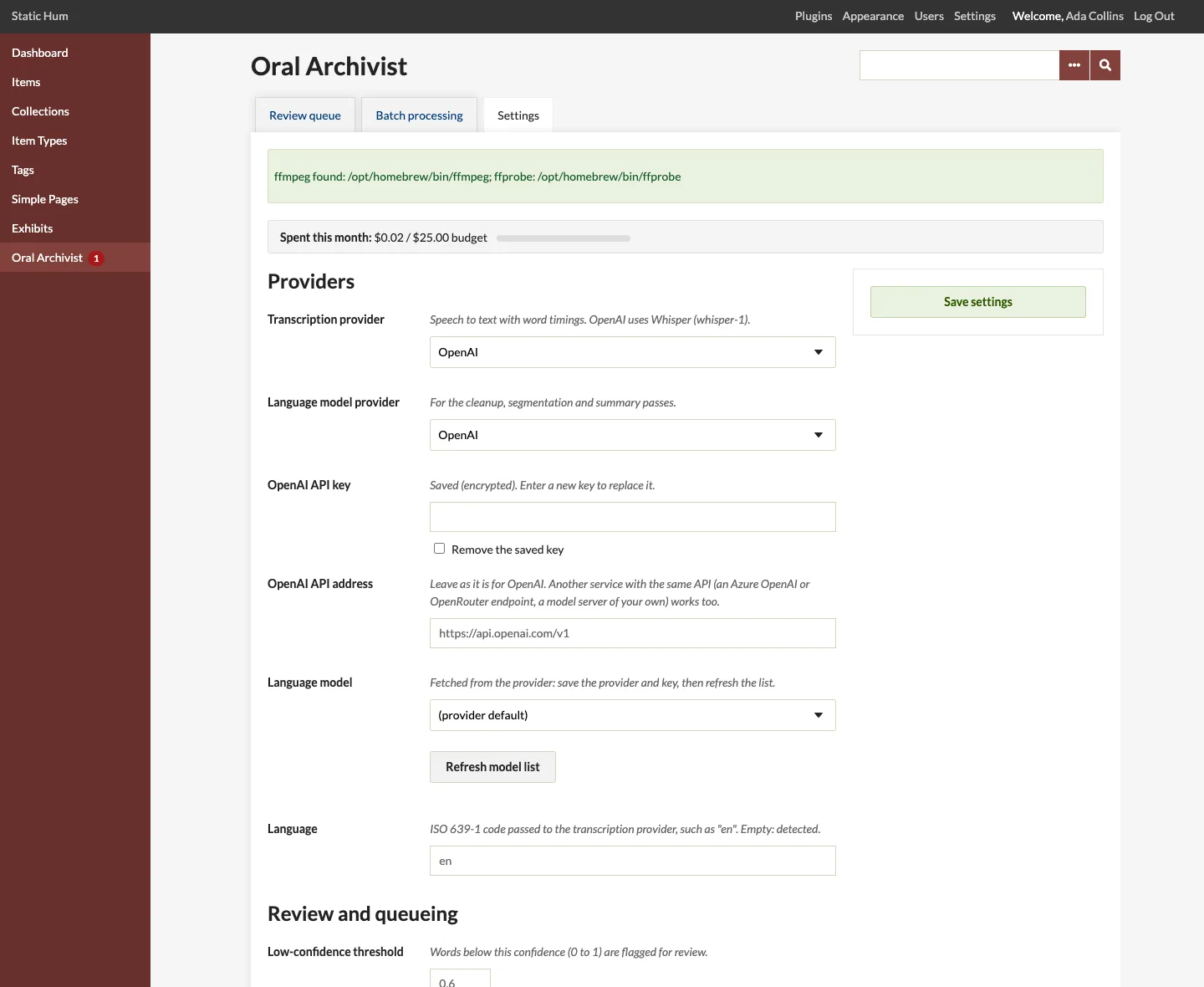
Providers
| Setting | Default | Description |
|---|---|---|
| Transcription provider | Mock | Mock produces a fake transcript at no cost; OpenAI uses Whisper (whisper-1) with word timestamps. |
| Language model provider | Mock | Used for the cleanup, segmentation and summary passes. |
| OpenAI API key | Stored encrypted; never shown again. Leave the field empty to keep the saved key. Can be set in config.ini instead. |
|
| OpenAI API address | https://api.openai.com/v1 |
Another service with OpenAI's API (an Azure OpenAI or OpenRouter endpoint, a model server of your own) works too. Can be set in config.ini. |
| Language model | provider default | Fetched from the provider with Refresh model list (save the provider and key first). The default is gpt-4o-mini. If the chosen model disappears from the provider's list, the default is used and the page warns you. |
| Language | detected | ISO 639-1 code, such as en, passed to the transcription provider. |
Review and queueing
| Setting | Default | Description |
|---|---|---|
| Low-confidence threshold | 0.6 | Words below this confidence (0 to 1) are flagged for review. |
| Queue new audio and video | Off | Process audio and video files automatically when they are added, within the daily cap and the monthly budget. |
| Daily automatic queue cap | 25 | At most this many files are queued automatically a day (UTC). Files passed over are listed on the review queue page, to queue from Batch processing. Queueing by staff is not limited. |
| Attempts per stage | 3 | A failed stage is tried again, after a pause, until this many attempts are used. |
| Summary element | none | When chosen, processing adds an AI summary, editable in review, and publishing writes it to this element of the item, such as Dublin Core: Abstract. What the element held is replaced. None: no summary pass, at no cost. |
Costs and budget
| Setting | Default | Description |
|---|---|---|
| Monthly budget (USD) | 0 (none) | Queueing is refused, and running jobs stop before their next paid stage, once the month's spend would go over it. |
| Transcription rate (USD a minute) | 0.006 | Matches OpenAI whisper-1. |
| Model input rate (USD per million tokens) | 0.15 | |
| Model output rate (USD per million tokens) | 0.60 |
See Costs and Budgets.
On the site
| Setting | Default | Description |
|---|---|---|
| Player on item pages | On | Item pages show the player of each published interview among the item's files. |
| Player on file pages | On | A file's page shows the player in place of the file's own audio or video. |
| Placement on item pages | After | After the item's metadata (where plugins add to item pages), or before it, under the item's title. |
| Page layout | Classic | How the player, chapters and transcript are arranged. |
| Player style | Basic | The look of the audio player. |
| Transcript label | "AI-assisted transcript, reviewed by staff" | Shown above each public transcript. Empty: no label. |
| Link in the main navigation | Off | Adds Oral Histories (/oral-history) to the main navigation. Order it, or rename it, under Appearance > Navigation. |
| Navigation label | Oral Histories |
See The Player and Layouts and Styles.
Prompts
The Cleanup prompt, Segmentation prompt and Summary prompt are the instructions of the three language-model passes. The defaults are tuned for the JSON shapes the plugin expects; a customized cleanup or segmentation prompt must still ask for the JSON shape shown at its end. Emptying a prompt restores the default.
Audio processing
| Setting | Default | Description |
|---|---|---|
| ffmpeg path, ffprobe path | detected | Looked for in /opt/homebrew/bin, /usr/local/bin and /usr/bin. Set them when the programs live elsewhere. |
| Audio chunk length (seconds) | 600 | Recordings over the provider's upload limit (25 MB for OpenAI) are split into chunks of this length. |
| Audio chunk overlap (seconds) | 5 | Overlap between chunks, so words at a boundary are not lost. |
| Cleanup chunk size (characters) | 12000 | How much transcript each cleanup request sends. |
Without ffmpeg
Some servers have no ffmpeg, or do not allow PHP to run programs. Oral Archivist then still works for audio, with these limits; the settings and batch pages say when ffmpeg is missing:
- Video files cannot be queued: their audio track cannot be extracted.
- Audio files are sent to the provider as they are, not converted to compact mono MP3 first, so each must be within the provider's upload limit (25 MB for OpenAI, about 25 minutes of a 128 kbps MP3) and in a format it accepts (OpenAI takes mp3, m4a, wav, ogg, flac and webm). Longer recordings fail at the transcribe stage with the size in the message.
- Durations and estimates come from the bit rate Omeka read when the file was added, when it has one; otherwise the estimate is unknown until the provider reports the duration.
Files stored elsewhere
On sites whose files are kept in cloud storage (such as Backblaze B2), the original of each file is downloaded by its address to a temporary folder for processing, and removed afterwards. Estimates on the batch screen then come from the file's bit rate, when Omeka knows it.