Open Oral Archivist in the admin menu to see the review queue, then Review an interview. Nothing is visible to the public until it is approved here. The review queue and the review screen are for Super Users and Admins.
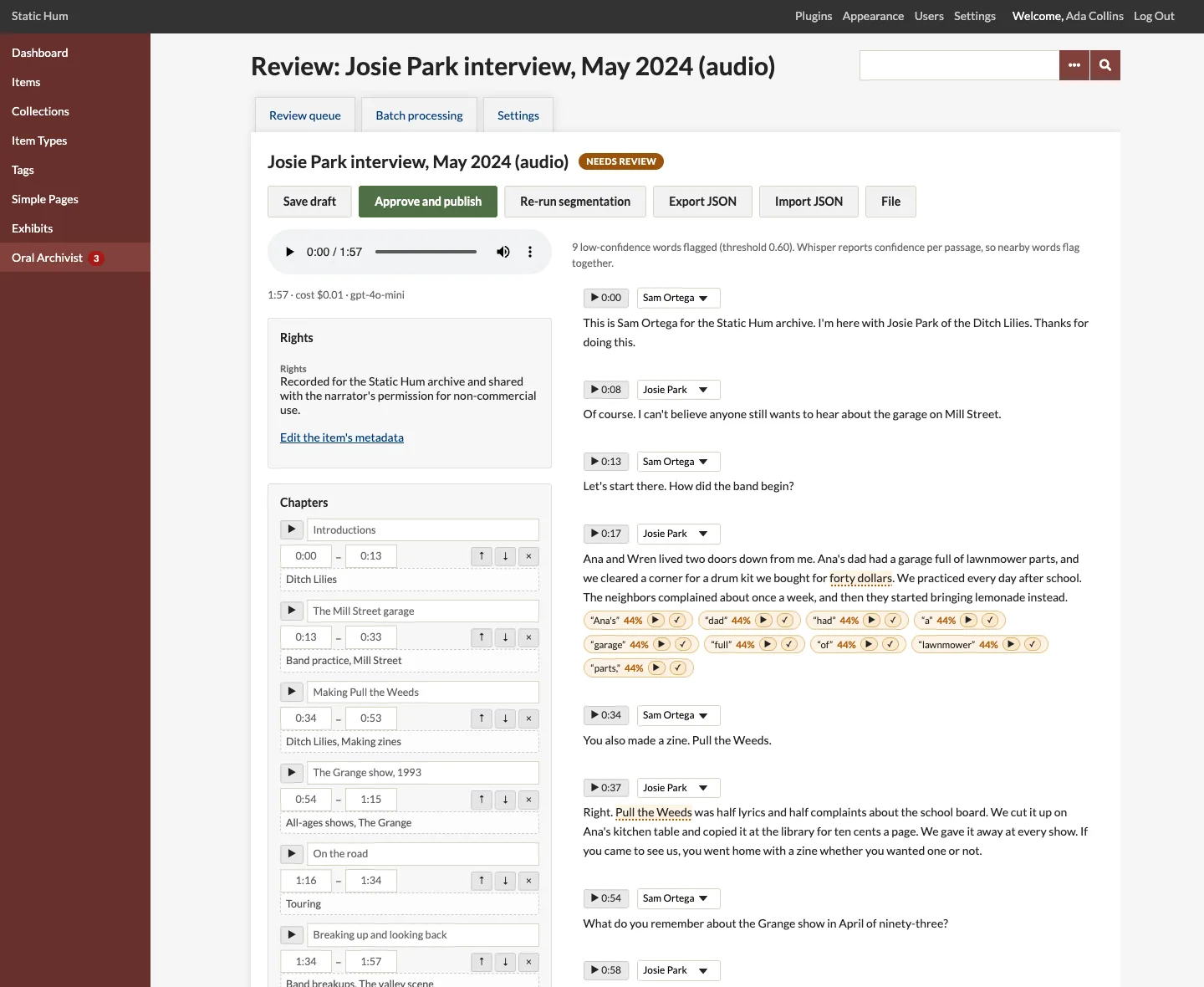
The review screen
- The interview's player, at the side. Every timestamp, chapter and flag has a play button that seeks to it.
- The transcript as editable paragraphs, each with a speaker and its start time.
- The chapters, with titles, times and topics edited in place.
- Flags on low-confidence passages.
- The summary, when summaries are on, the footnotes, the speakers, the rights statement of the file or its item, and the processing log.
Changes are kept when you click Save draft or Approve and publish. Save draft leaves the interview in the review queue. The page warns you before you leave it with unsaved changes.
Fixing flagged passages
Words below the confidence threshold are flagged under their paragraph. Whisper reports confidence per passage rather than per word, so nearby words flag together. For each flag:
- Click its play button to hear the passage, from three seconds before the word.
- Correct the paragraph's text if needed.
- Click the check mark to mark it reviewed.
Editing paragraphs
Paragraph text is edited in place. Hovering a paragraph shows its tools:
- + Chapter adds a chapter with the paragraph's time range, titled from its first words.
- Merge ↓ joins the paragraph with the next one.
- Split splits the paragraph where the cursor is. The new paragraphs' times come from the raw transcript's word timings, never invented. A split through a footnote is refused.
- Note adds a footnote to the selected words. See Footnotes.
Speakers
Whisper does not tell speakers apart. Add the speakers' names with Add speaker, then choose each paragraph's speaker. Renaming a speaker renames every paragraph of theirs.
Chapters and topics
Adjust chapter titles and times (as m:ss or h:mm:ss), add, reorder or remove chapters, and edit each chapter's topics, separated by commas. Topics are shared by all interviews and make the public topic pages. See Segments and Topics.
Re-run segmentation asks the model for a new set of chapters. It replaces the chapters, your edits included, and runs only that pass.
Summary
When a summary element is chosen in the settings, the summary panel holds the AI draft, to edit. Generate summary with AI (or Regenerate) runs only the summary pass, so nothing else is billed again: use it for interviews processed before summaries were turned on.
Publishing and unpublishing
Approve and publish makes the interview public:
- The player appears on the item's page and on the file's page.
- The transcript joins the search text of the file and the item, so Omeka's site search finds the interview by what was said.
- The summary, if any, is written to the chosen element of the item. When an item has several published interviews, the element holds one text per interview.
- The word timings used by "Search this interview" are worked out and kept.
Unpublish undoes all of it: the player disappears, the transcript leaves the search, and the summary is removed from the item. The interview goes back to the review queue and can be published again later.
Edits to a published interview (text, speakers, chapters, footnotes) show on the public site as soon as they are saved. Re-running segmentation, generating a summary or processing again need the interview unpublished first.
Audit Trail
With the Audit Trail plugin installed, publishing, unpublishing, queueing, retries, imports, re-segmentation, summary requests and settings changes are logged there, with who did them.