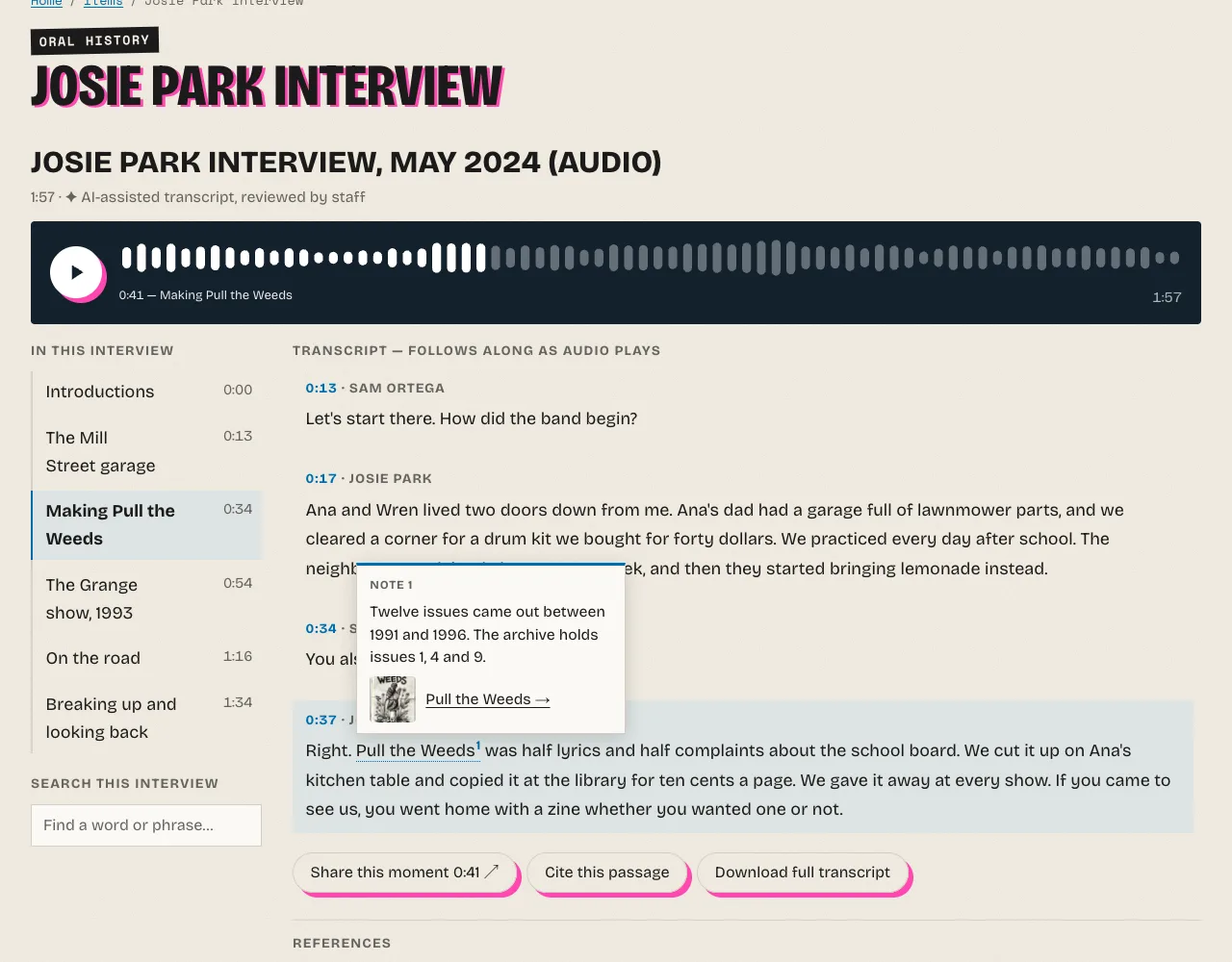
Published interviews appear on the public site as a synchronized player.
Where it appears
-
Item pages: one player for each published interview among the item's files, after the item's metadata (or under its title, with the before placement). Turn it off with Player on item pages in the settings.
-
File pages: the player takes the place of the file's own audio or video. Turn it off with Player on file pages.
-
Simple pages and exhibits, with the shortcode:
[oral_history file="34"] [oral_history item="35"] [oral_history file="34" layout="document" style="compact" start="54" heading="Josie Park on the Grange show"]fileshows one interview,itemevery published interview of the item.layoutandstyleoverride the settings for this player,startbegins playback at that many seconds, andheadingadds a title above it. A file without a published transcript, or that the visitor may not see, shows nothing. -
From a theme, with the view helper, anywhere in a template:
<?php echo $this->oralHistoryPlayer($file); ?>
<?php echo $this->oralHistoryPlayer($file, ['layout' => 'sidecar', 'start_ms' => 54000]); ?>
It returns nothing when the file has no published transcript, so themes can call it for any file. Themes can also override the player's template by copying
views/shared/common/oral-archivist-player.phptocommon/oral-archivist-player.phpin the theme.
On item pages the plugin hides the page's own player of the same file, from Omeka or from a plugin such as Html5 Media, and what is left empty around it, so there is one player. Without JavaScript the browser's player shows instead.
What visitors get
- A synchronized transcript that highlights the current paragraph and scrolls with playback. Clicking a time or a chapter plays from there.
- A chapter index ("In this interview") that follows the current chapter.
- A readout of the elapsed time, the current chapter and the duration.
- Speaker names, and the transcript label from the settings.
- Footnotes with popups and a References list. See Footnotes.
- Share this moment copies a link to the current time, Cite this passage copies a citation, and Download full transcript saves the text. They work in the browser and are hidden without JavaScript.
The transcript is real text in the page: screen readers and search engines read it, and it reads without JavaScript.
Deep links
Add #t=125 or ?t=125 to an item's or a file's address to start playback at 125 seconds. On items with several interviews, the links made by Share and Cite name the file, as in #t=125-m34 (file 34), so they open the right player. A plain #t= applies to the first player of the page.
Search this interview
The player has a search box that highlights every occurrence of a word or phrase in the transcript. Each match is tied to the moment the word is spoken, so clicking it plays from there. The word timings are worked out at publishing.
Site search
When an interview is published, its transcript joins the search text of its file and its item, so Omeka's site search (the search box of most themes, /search) finds them by what was said. Re-indexing the site search (Settings > Search > Index Records) keeps them. The items browse page's simple search looks only at metadata, as in Omeka itself; use the site search, or the segment search at /oral-history.