Billing in RefBytes is designed to stay out of your way. Your team has one subscription, you can see exactly what you are paying on our pricing page, and everything about payments happens in a secure billing portal.
How subscriptions work
Your subscription belongs to your team, not to any one person. One plan covers everyone you invite, and an active subscription is what lets your team create sites.
Billing itself is handled by the person who created the team's account: they are the one who sees the Choose a plan and Manage Subscription buttons. If you have a billing question and that is not you, they are the person to ask.
Choosing a plan
Our current plans and prices are on the public pricing page. Use the Annually / Monthly switch at the top to compare. When the account owner is signed in, each plan has a Subscribe button that takes you to a secure Stripe checkout and back to your dashboard when it is done. Everyone else on the team sees which plan is current and a note that the account owner manages billing.
To move to a different plan later, come back to the pricing page and click Switch plan on the one you want. The change takes effect right away.
Free trials
New accounts can take a look around before paying. When a plan offers a free trial, the account owner sees Start free trial on it on the pricing page (visitors see the same button, which creates an account first). There is no card to enter: you can sign in, explore the dashboard, browse the premium modules and themes, and invite your team. Your dashboard shows how many days are left.
Creating sites needs a subscription. You can subscribe at any point during the trial, and billing starts when the trial ends, so subscribing early doesn't cost you any trial days. Each team gets one trial; if you need a little more time to decide, get in touch.
Managing your billing
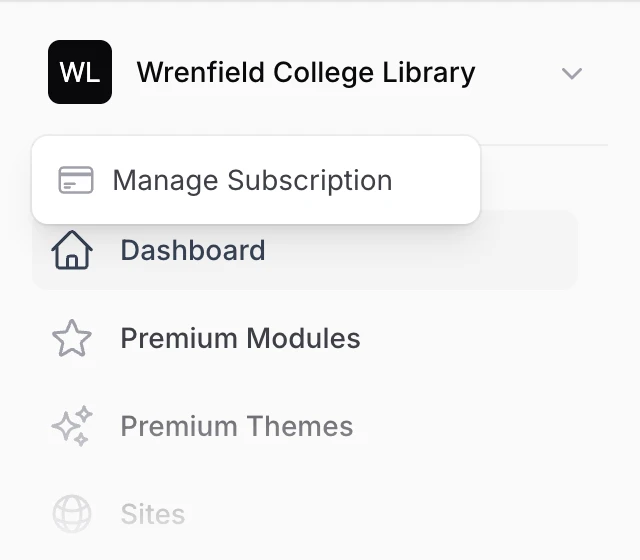
Click your team's name at the top of the menu and choose Manage Subscription. You will be taken to a secure billing portal where you can:
- Download invoices and receipts
- Update your card or payment details
- Cancel your subscription
The portal is run by Stripe, the payment company that handles our subscriptions. Your card details go directly to them, which means we never see or store your card number. That is a good thing: payment security is their entire business.
Any changes you make in the portal, like updating a card, take effect on your account right away. When you are done, the portal sends you back to your dashboard.
If your team hasn't subscribed yet, including on a free account or a free trial, Manage Subscription takes you to the pricing page to choose a plan instead.
Custom plans for libraries and institutions
If your institution needs something other than the plans on our pricing page, or has to pay by invoice rather than by card, get in touch. We can set up a plan just for your team, with the number of sites, people, and file storage you need, with or without circles and site templates, billed yearly or monthly.
Instead of entering a card, you pay by invoice. Stripe emails each invoice to your billing contact with a link to pay it, and sends a new one at each renewal. Your team can use the plan right away, before the first invoice is paid.
On a custom plan, Your plan in the menu shows how much of each limit your team is using and what the plan includes. The account owner also sees the price and invoices there, and Manage Subscription opens this page instead of the billing portal. We manage these plans for you, so to change a limit, the price, or your billing contact, or to add Solr search, get in touch.
Here is how the limits work:
- Sites: once you have used them all, you can't create or copy another site. When you create sites from a template, the whole list has to fit.
- People: this counts everyone on your team, plus invitations that haven't been accepted yet. Once it's full, you can't send new invitations, though you can still resend one that's waiting.
- File storage: we measure this once a day. If your team goes over, your team's owners get an email and new sites are paused. Your existing sites and uploads keep working.
Solr search servers
If your team uses Solr search, each search server is a paid add-on billed on top of your plan, on the same subscription. Like the plan itself, the add-on is managed by the account owner. You can read about what it does in what Solr adds, and the charge shows up alongside your plan on your invoices.
Common questions
Who on my team can manage billing? The person who created the account. If billing should be someone else's job, get in touch and we will help.
Where do I find an old receipt? In the billing portal, under Manage Subscription. Every invoice is there to view or download.
What happens if I cancel? You will not be able to create new sites without an active subscription. If you are thinking about leaving and have questions about your sites and data, get in touch and we will walk you through it.